SMTP Error 450 4.7.0 is one of the most confusing SMTP errors a sender might receive. It can be a scary and very frustrating bounce back message that every email user can encounter.
But what does it exactly mean and what are its implications? This article will explore SMTP Error 450 4.7.0, what it is, and what to do about it.
What is SMTP Error 450 4.7.0?
SMTP Error 450 4.7.0 often comes with the following error messages:
- “450 4.7.0 Service temporarily unavailable due to security policies“
- “450 4.7.0 Temporary authentication failure”
This error code appears when your email server refuses to accept or relay your message which can cite security concerns. Let’s break down what the code means:
- SMTP Error code 450 4.7.0 belongs to the SMTP Error 450 category, which refers to a temporary error in the email delivery process. Errors that start with these codes implies that the problem is temporary and is entirely solvable.
- Meanwhile, the “4.7.0” sub-code provides more granular information about the specific type of temporary failure you’re experiencing.
- Combined, the error means the problem involves security protocols, authentication requirements, or policy enforcement on the receiving server.
What does it mean when you experience SMTP 450 4.7.0?
Receiving this error indicates that the receiving mail server’s security policies or authentication mechanisms are preventing immediate message delivery. However, there are still a variety of factors that you should understand in order to completely be free from all concerns. Here are some of the factors that can potentially trigger this error:
- Authentication or security protocol issues
- Sender reputation checks
- Rate limiting and throttling
- Greylisting implementation
- Delays in SPF, DKIM, or DMARC validation
- Temporary blacklist or reputation issues
- Policy-based content filtering
Tips to resolve SMTP Error 450 4.7.0
We’ve identified that this particular error concerns a security protocol or issue, or possibly some sender reputation checks; so waiting it out should not be your only solution. Taking some extra troubleshooting steps would not hurt, in fact it might help you further ensure that your deliverability is safe, your reputation is secured, and your email health ideal.
Retry after a while
Sometimes, you really just have to wait for the error to subside. After all, the issue is temporary and patience is the perfect troubleshooting step. Many email systems will automatically retry sending your message multiple times over a period ranging from several hours or in some cases three to five days. These automatic retry attempts happen in the background without any action required from you.
Verify your email authentication records
The first technical step should be confirming your authentication setup is correct and functioning properly.
Check that your SPF, DKIM, and DMARC records are properly configured and published in your DNS. Use online validation tools to test these records and ensure they’re returning the expected results. Misconfigurations in authentication can trigger security-based deferrals.
Check your sender reputation
Monitor your sending domain and IP address reputation across major blacklist databases and reputation services.
Even if you’re not fully blacklisted, poor reputation scores can trigger enhanced security screening. Use tools like MXToolbox, Google Postmaster Tools, or Microsoft SNDS to monitor your sender reputation and identify potential issues.
Related Reading: How to Improve Your Email Sender Reputation Score Fast
Take a look at your sending patterns
If you’re sending multiple emails in rapid succession or sending bulk emails, your sending pattern might be triggering rate limiting or security policies on the receiving server.
Make sure that you are using the proper tools and infrastructure designed, especially if you are sending bulk emails. If your domain is new, then consider warming it up to send signals to email service providers that your domain is reputable and not spam.
Related Reading: The Science and Process of Warming Up Newly Created Email Domains
Ensure proper TLS/SSL configuration
Verify that your mail server is using current TLS versions and has valid SSL certificates. Outdated encryption protocols or expired certificates can trigger security deferrals. Ensure your server supports modern TLS versions and has properly configured security settings.
Review message content and headers
Examine whether your message content, attachments, or email headers might be triggering content-based security policies.
Avoid words that trigger spam filters, suspicious attachments, or malformed headers that could cause policy-based deferrals. Ensure your messages follow email best practices and don’t resemble common spam patterns.
Contact the recipient’s email administrator
If the error persists across multiple retry attempts, and the message is urgent, consider reaching out to the recipient through alternative channels instead. Sometimes, the recipient may not be aware of overly strict security policies on their mail server, and it will also be great for them to be notified. They may be able to whitelist your domain or adjust policies to allow your messages through.
Monitor for IP or domain blacklisting
Regularly check if your sending IP address or domain has been added to any spam blacklists. Use multiple blacklist checking services to get comprehensive coverage. If you discover you’re listed, follow the delisting procedures for each service and address the underlying cause of the listing.
How Warmy can prevent SMTP Error 450 4.7.0

SMTP Error 450 4.7.0 often relates to sender reputation and authentication issues, making Warmy.io an invaluable tool for prevention. A robust email deliverability platform like Warmy can strengthen your email infrastructure and significantly reduce security-related delivery errors.
Progressive email warm up and reputation building

Warmy’s progressive email warmup tool gradually establishes your sending domain as a legitimate, trustworthy source through carefully orchestrated engagement patterns that signal quality to email service providers. This is extremely useful if you have a new or inactive domain.
Additionally, Warmy’s dedicated inbox placement test provides real-time visibility into message routing. It shows you the percentage of emails landing in the inbox, getting filtered to spam, or landing in promotional folders, enabling swift corrective action when needed.
Related Reading: The Science and Process of Warming Up Newly Created Email Domains
Authentication protocol implementation
Warmy’s free SPF Record Generator and free DMARC Record Generator offer convenient ways to ensure your DNS records are correctly configured, and ensure that you have the ideal email hygiene.
By ensuring your sending infrastructure is properly configured and maintained, Warmy creates optimal conditions for successful email delivery and reduces the likelihood of encountering temporary delivery failures of any kind.
Real email interaction through seed lists

Warmy.io’s seed list technology allows organizations to stress-test and optimize campaigns before deploying them to real contacts.
This methodology ensures superior deliverability and reduced bounce percentages. In contrast to legacy warming approaches that offer limited engagement data, Warmy’s seed list employs authentic email accounts that meaningfully interact with your messages. This “interaction” includes:
- Messages being genuinely opened with content thoroughly reviewed, going beyond simple read receipts
- Natural clicking behavior on embedded links, demonstrating to email providers that your content generates legitimate interest
- Manual spam folder retrieval and importance flagging for any misrouted messages, educating ISPs about your email legitimacy
Domain Health Hub
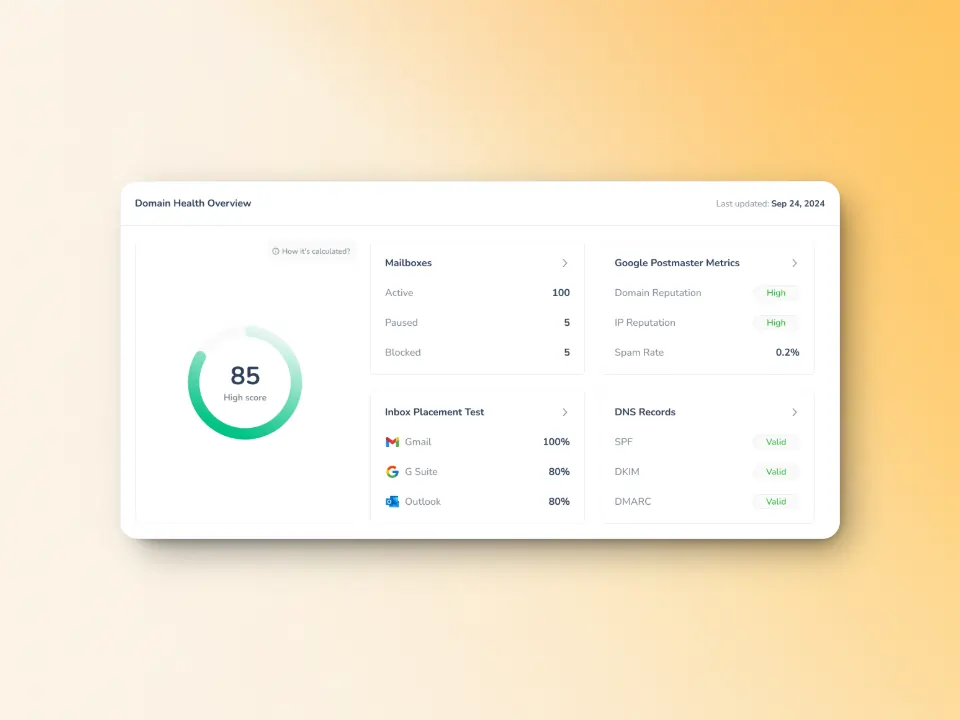
Warmy provides end-to-end monitoring of your domain’ health. The dashboard displays data such as:
- A domain health score based on authentication, blacklist status, and email deliverability test results.
- Weekly and monthly spam rate trends
- DNS status checks to help validate SPF, DKIM, DMARC, rDNS, MX and A records
- Multi-domain monitoring gives users the ability to manage all their domains from a singular dashboard.
With Warmy.io, you can minimize any major SMTP errors by ensuring everything on your end is in tip-top shape. You can also ensure that even if you receive temporary SMTP errors your inbox and deliverability are within the ideal health and hygiene. Sign up for your free trial today.
FAQ
What is SMTP Error 450 4.7.0?
SMTP Error 450 4.7.0 often comes with the following error messages: “450 4.7.0 Service temporarily unavailable due to security policies” or “450 4.7.0 Temporary authentication failure.” This error usually points to a temporary error often involving security protocols, authentication requirements, or policy enforcement on the receiving server.
How long does SMTP Error 450 4.7.0 typically last?
SMTP Error 450 4.7.0 usually resolves within a few hours as it indicates a temporary security or policy check. Most email systems will automatically retry delivery for 3-5 days.
Is SMTP Error 450 4.7.0 caused by something I did wrong?
Not necessarily. This error indicates the receiving server’s security policies are being cautious, which could be due to your sending patterns, authentication configuration, or reputation.
Should I keep trying to resend my email when I get this error?
Your email system will automatically retry delivery, so manual resending isn’t necessary immediately. If the message is urgent, wait at least 30 minutes to an hour before manually retrying to allow time for security checks to complete.