TL;DR: Woody’s SMTP Blacklist is a small, independently run DNSBL that lists IPs caught by its spam traps, mainly at listme@blacklist.woody.ch. A listing rarely affects delivery to Gmail, Outlook, or Microsoft 365, since those providers use their own reputation signals, but it does flag a real list-hygiene issue. Fix the cause, then request delisting through Woody’s own lookup tool.
Woody’s SMTP Blacklist is a specialized database that identifies IP addresses known for sending spam. Its role is crucial in maintaining the integrity and reliability of email communication. If your IP address finds its way onto this blacklist, it can lead to substantial email deliverability problems, directly impacting your ability to communicate effectively via email.
The focus of this article is twofold: firstly, to elucidate what Woody’s SMTP Blacklist is and the common reasons an IP address might be listed. Secondly, and most importantly, we aim to provide a clear, step-by-step guide on how to extricate your IP from this blacklist. Understanding these elements is not just about solving a current problem; it’s about equipping yourself with the knowledge to prevent future occurrences and maintain a robust email communication channel.
Understanding Woody’s SMTP blacklist
Understanding Woody’s SMTP Blacklist requires delving into the mechanics of email communication and the critical role played by SMTP (Simple Mail Transfer Protocol) blacklists. Woody’s SMTP Blacklist, in particular, is a diligently curated database that identifies and flags IP addresses known for distributing spam emails. It acts as a sentinel, ensuring that only legitimate, non-spam emails make their way to a user’s inbox.
In practice, Woody’s SMTP Blacklist carries less weight than Tier 1 lists like Spamhaus or Barracuda. Major inbox providers such as Google, which publishes its own email sender guidelines, and Microsoft rely primarily on their own reputation signals rather than third-party DNSBLs, so a Woody’s listing alone is unlikely to block mail to Gmail or Outlook. It still matters: smaller mail servers, corporate spam filters, and some ESPs do check it, and a listing is a reliable early warning that a spam trap caught your traffic.
Woody’s SMTP Blacklist adds transparency to that process: listed IPs are published openly, so mail admins and blacklist-monitoring tools can check status without contacting the operator directly. Delisting is manual, and repeated relisting is common if the underlying sending practice isn’t fixed first.
Reasons for being blacklisted on Woody’s SMTP
When discussing the reasons why an IP might end up on Woody’s SMTP Blacklist, it’s crucial to recognize the various triggers that can lead to this unfortunate situation. These triggers are not just indicators of potential spam activity, but they also reflect practices that can undermine the credibility of your email communications. Here are some common reasons:
Sending Spam or Unsolicited Emails
At the forefront of reasons for blacklisting is the distribution of spam or unsolicited emails. These are messages sent in bulk, often without the explicit consent of the recipients. Not only do they clutter inboxes, but they also violate best practices in email marketing and communication.
High Volume of Email Complaints
If a significant number of recipients mark your emails as spam, this can lead to your IP being blacklisted. These complaints indicate to email service providers and blacklist operators like Woody’s SMTP that your emails are not well-received, suggesting a potential abuse of the email system.
Sudden Spikes in Email Traffic
An abrupt and substantial increase in the volume of emails sent from an IP address can raise suspicions. Such spikes are often associated with spam campaigns, where large quantities of emails are distributed in a short timeframe.
Poor Email List Management
Maintaining an updated and clean email list is crucial. Using outdated, purchased, or non-consensual email lists can result in high bounce rates and spam complaints, which are red flags for blacklisting entities.
Understanding these reasons is key to not only addressing a current blacklisting issue but also in implementing practices that uphold the sanctity of email communication. Adherence to email best practices is not just about avoiding blacklists like Woody’s SMTP, but also about fostering a respectful and effective email communication environment.
Pro Tip: Before requesting delisting, check whether the spam trap that caught you came from a purchased list, a scraped address, or a long-dormant subscriber. Woody’s list mainly catches senders who load unverified addresses into a campaign, so cleaning your list first prevents an instant relisting.
Steps to remove your IP from Woody’s SMTP blacklist
Removing your IP address from Woody’s SMTP Blacklist involves a structured approach, which is essential for effectively addressing the issue and ensuring a swift resolution. Here is a step-by-step guide to navigate this process:
Check If Your IP is Blacklisted
– Begin by verifying if your IP address is indeed listed on Woody’s SMTP Blacklist.
– Use this blacklist checking tools, which allow you to enter your IP address and check its status across various blacklists, including Woody’s.
Contact Woody’s SMTP for Removal
Once you’ve confirmed the listing, submit a delisting request directly to Woody’s SMTP. Since this is a personal, volunteer-run list, requests are reviewed manually, so state clearly what caused the listing and what you’ve already fixed.
Keep the message factual and specific: include your IP address, the approximate date you were listed, and a short description of the fix, for example removing a purchased list, patching a compromised script, or adding double opt-in to your signup form.
Pro Tip: Don’t send a second removal request while the first is still pending. Repeated submissions from the same IP can look like an attempt to game the review process and slow everyone else down too.
Provide Necessary Information or Evidence
In your removal request, include any relevant information or evidence that supports your case. This may include:
- Details of any remedial actions you’ve taken to address the reasons for blacklisting (e.g., improving email practices, cleaning your email lists).
- Any relevant technical details or changes in your email infrastructure.
- Be honest and transparent in your communication, acknowledging any mistakes and demonstrating your commitment to adhering to best email practices.
Waiting Period and Confirmation
- After submitting your request, there may be a waiting period. Blacklist administrators often review removal requests thoroughly before making a decision.
- Keep an eye on your email for any communication from Woody’s SMTP regarding your request. This may include a confirmation of removal or a request for additional information.
- Regularly check your IP’s status on the blacklist during this period to see if it has been removed.
Want to stop chasing blacklist removals altogether? Start a free Warmy.io trial and let Adeline AI build your sender reputation with real engagement signals before your next campaign goes out.

Preventative measures for the future
To safeguard your IP address from future instances of blacklisting on platforms like Woody’s SMTP, adherence to certain preventative measures is paramount. These best practices are not just about avoiding the blacklist; they are about fostering a responsible and respected presence in the realm of email communication. Here are some key tips:
Maintain Good Email Practices
Upholding ethical and professional email practices is the cornerstone of a healthy email ecosystem. This includes obtaining explicit consent from recipients before sending emails, providing clear and easy opt-out options, and ensuring the content of your emails is relevant and valuable to your audience.
Regularly Clean and Update Email Lists
Diligent management of your email lists plays a crucial role in maintaining your sender reputation. Regularly remove unresponsive or inactive subscribers, correct or delete invalid email addresses, and avoid purchasing email lists. This not only reduces the risk of spam complaints but also enhances the effectiveness of your email campaigns.
Monitor Email Sending Reputation
Keeping a vigilant eye on your email sending reputation is critical. Utilize tools and services that provide insights into how your emails are being received and flagged by recipients and ISPs. Monitoring for any unusual activities, like spikes in bounce rates, complaint rates, or a jump in SMTP error codes in your bounce logs, can help you take corrective action promptly. Microsoft’s own NDR reference for Exchange Online is a useful companion if you need to decode a specific bounce.
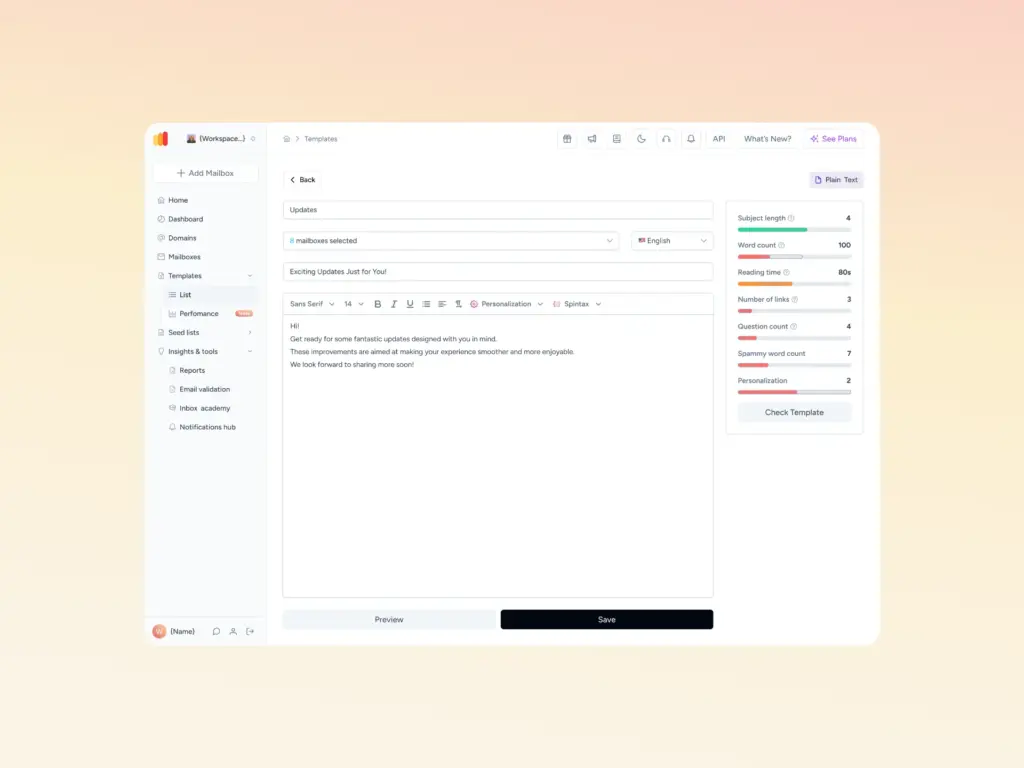
For related lists worth knowing about, see Warmy’s guides to the 5-step blacklist removal process, the top IP blacklist removal tools, and delisting from UCEPROTECT L2. To check your own status right now, run a free Email Deliverability Test or scan a draft for spam triggers with the Template Checker before your next send.
The importance of email warm-up
The concept of “warming up” emails is a critical strategy in the realm of email marketing and communication, particularly for those looking to maintain a robust sender reputation. Email warm-up is akin to a trust-building exercise between email senders and Internet Service Providers (ISPs).
What is Email Warm-Up?
- Email warm-up is the process of gradually increasing the volume of emails sent from a new email account or IP address.
- The purpose is to build a positive sending reputation with ISPs and avoid being flagged as spam.
- This process involves sending emails to a small group of recipients initially and gradually increasing the number over time, ensuring that these emails are engaged positively (opened, replied to, etc.).
Role in Maintaining Sender Reputation
Building Trust with ISPs
By warming up emails, senders demonstrate to ISPs that their email traffic is legitimate and not spam. This is crucial for new email accounts or IPs which lack a historical sending reputation.
Avoiding Spam Filters
A sudden surge in email volume from a new account can trigger spam filters. Warming up helps in avoiding these triggers, ensuring that emails reach the intended inboxes.
Enhancing Deliverability
A good sender reputation, bolstered by a proper warm-up process, ensures higher deliverability rates. This means emails are more likely to be accepted by ISPs and less likely to end up in spam folders.
Preventing Blacklisting
Regular and consistent engagement through warmed-up emails establishes a pattern of legitimacy. This significantly reduces the risk of being blacklisted by services like Woody’s SMTP.
Pro Tip: Warm up new domains and IPs even if you’ve never been blacklisted before. Providers trust senders with an established, gradual sending history far more than one with a clean but blank record.
Utilizing email deliverability tools: Warmy.io

Introduction to Warmy.io
Warmy.io is a sophisticated email deliverability tool specifically engineered to assist in the email warm-up process.
It is designed to systematically increase the volume of emails sent from an IP address or email account, thereby building a positive sender reputation over time.
Warmy.io caters to both new email accounts and IPs that need to establish credibility, as well as existing ones seeking to improve or maintain their email deliverability.
How Warmy.io Works
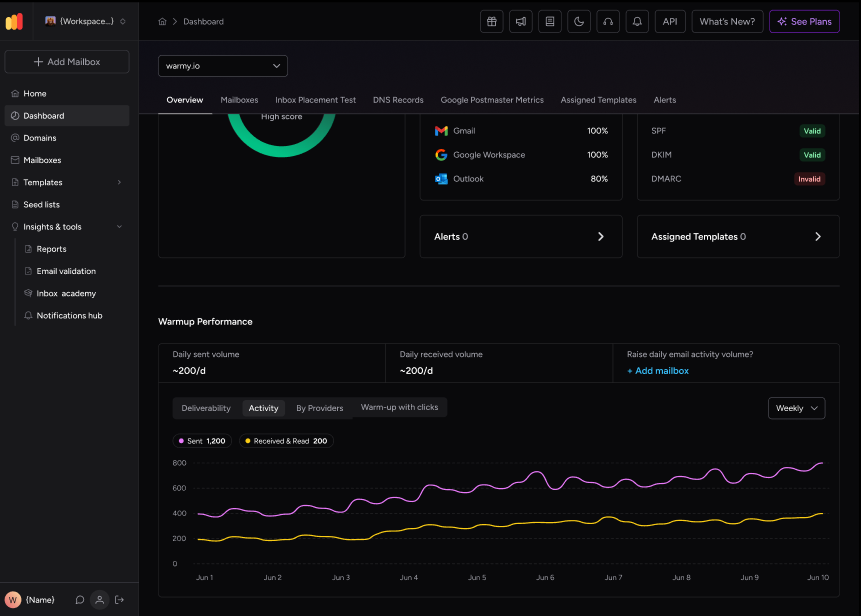
Warmy.io operates by gradually sending emails from the user’s account to a network of email addresses controlled by Warmy.io.
These emails are then interacted with (opened, replied to, etc.) to mimic genuine engagement, a key factor in building a trustworthy sender profile.
The tool provides a controlled environment where the number of emails sent and the level of engagement can be steadily increased, aligning with best practices in email warm-up.
Benefits of Using Warmy.io
- Preventing Blacklisting. By ensuring a gradual and controlled increase in email activity, Warmy.io significantly reduces the risk of being flagged as spam and subsequently blacklisted by services like Woody’s SMTP.
- Enhancing Email Deliverability. With its systematic approach to warming up emails, Warmy.io helps in achieving higher email deliverability rates. This means emails are more likely to land in the intended inboxes rather than spam folders.
- Maintaining Sender Reputation. Warmy.io aids in establishing and sustaining a positive sender reputation, which is crucial for long-term email communication success.
- Time and Resource Efficiency. Automating the warm-up process with Warmy.io saves time and resources, allowing users to focus on other aspects of their email strategies.
Conclusion
In conclusion, this article has navigated through the essential aspects of managing and safeguarding your email communications, particularly focusing on the challenges and solutions related to Woody’s SMTP Blacklist.
The article provided a detailed guide on how to remove your IP from Woody’s SMTP Blacklist, emphasizing the need for transparency and corrective measures in the removal process.
Tools like Warmy.io provide a proactive approach to managing email health, reinforcing the significance of responsible email management. By embracing these practices and tools, you can ensure that your email communications remain effective, trustworthy, and above all, deliverable.
Ready to protect your sender reputation for good? Book a free demo with Warmy.io and see how automated warm-up, seed lists, and domain monitoring keep every campaign out of blacklists like Woody’s SMTP.