SMTP Error 510 is a permanent delivery failure caused by attempting to send to an invalid or non-existent email address. To prevent this issue, senders can do the following:
- Implementing regular list hygiene and validation practices
- Setting up a double opt-in for new inbound leads
- Keeping an eye on bounce rates and engagement metrics
- Segmenting contact lists according to engagement level
Receiving the error code SMTP Error 510 – Bad Email Address can be frustrating because while the error itself is self-explanatory, it’s difficult to pinpoint which one of your contacts triggered the error.
For bulk senders, understanding and preventing SMTP Error 510 isn’t just about fixing individual failed messages. It’s about maintaining the overall health of your email infrastructure.
SMTP Error 510 – Bad Email Address: What does it mean?
SMTP Error 510 means that the recipient’s email address you are trying to reach is either invalid or non-existent. As part of the SMTP error codes beginning with 5XX, it is a permanent delivery failure.
It’s like the server’s way of saying “I don’t know who you’re trying to contact” or “The person you’re trying to contact does not exist.”
This error is triggered when the Simple Mail Transfer Protocol (SMTP) server attempts to verify the recipient’s email address and finds that it’s malformed, non-existent, or no longer active.
SMTP Error 510 is a straightforward and easy fix if you’re only sending an email to one person. But for high-volume senders, it can be quite the headache to resolve this on the spot.
So, how to stop 510 bad email address bounces? The best way is to prevent them from happening by making sure you only send to valid email addresses.
What causes email addresses to be invalid?
Email addresses become invalid due to data collection errors, changes in job roles or companies, outdated contact information, abandoned inboxes, spam trap creation, or as a consequence of bad sending behavior.
1. Human error (input & data collection issues)
- Typos in domains or usernames (e.g. gmial.com instead of gmail.com)
- Manual entry errors such as extra characters, missing dots, or wrong extensions.
- Misheard addresses from verbal exchanges
These happen more than one might think. TurboSMTP reports that 22% of email addresses collected via forms are incorrect or invalid, 15% have typos, and 7% are inactive. An easy solution would be to import the lead list from specific forms to Warmy’s Validation Tool to check for any invalid email addresses before you launch campaigns. You get 10,000 free credits when you sign up for any Warmy plan. Get started today.
2. Organizational change
Email addresses can be invalid when the owner has changes due to business reasons like:
- Job turnover (employees leaving companies)
- Company rebrands (changing company name often leads to change in domains and email addresses used by employees)
- Mergers and acquisitions
- Domain migrations and domain shutdowns
3. Data decay or list aging
According to Infobip, around 22.5% to 28% of email addresses on a list become invalid, inactive, or unusable within the span of a year. These are due to:
- Outdated contact lists
- Abandoned inboxes
- Deactivated accounts
- Recycled email addresses by providers
4. Infrastructure-level traps
These are addresses specifically created to detect bad sending behavior:
- Spam trap addresses
- Honeypot accounts created by ISPs and anti-spam organizations
- Scraped or purchased list contamination
5. Behavioral patterns (sender risk signals)
In some cases, email addresses are rendered invalid as consequences of:
- Repeated sending to invalid addresses or spamming
- Pattern recognition by ISPs
- Reputation degradation signals
Wondering if your domain or email address is at risk of being flagged? Try Warmy’s free Email Deliverability Test to get an idea of how mailbox providers view you.
How to fix SMTP Error 510?
The best way to fix SMTP Error 510 is to ensure you’re always sending to valid email addresses. Since it’s a permanent error, it won’t be resolved by simply resending the email without changing anything.
However, upon receiving this error code, you can do the following steps:
- Validate your contact list using tools like Warmy’s Email Validation Tool.
- Identify and remove invalid email addresses.
- Relaunch your campaign.
While this may not seem tedious, imagine having to do this on a large scale basis. You have multiple campaigns simultaneously happening, and you receive SMTP Error 510 for a few of them. It’s definitely inconvenient, frustrating, and can cause delays in your operations.
Additionally, consistently receiving SMTP errors can send negative signals to Email Service Providers (ESPs). They may view you as suspicious or a potential spammer, leading to potential blacklisting which is definitely something you want to avoid.
The good news: SMTP Error 510 can be avoided.
SMTP Error 510 – is there a way to avoid it?
Yes, most definitely. SMTP Error 510 is avoidable and preventable through real-time validation, regular list cleaning, setting up double opt-ins for inbound contacts, monitoring bounce rates and engagement rates regularly, and segmenting your lists.
1. Validate emails at the point of entry
If you’re getting contacts via an online form, use validation tools that can check the syntax and verify the email address actually exists even before the form is submitted. This helps avoid invalid addresses from entering your database in the first place.
2. Schedule regular list cleaning
This should be non-negotiable. Regular list cleaning is a mandated strategy that you should implement if you want to maintain a positive sender reputation score.
If you’re not sure where to start. Here is how:
- Set up a schedule to review your contact list
- Verify your entire contact list (do this at least quarterly).
- Remove any addresses that have consistently bounced
- Run your list through an email verification service to identify invalid, temporary, and risky addresses
3. Set up double opt-in process for inbound leads
A double opt-in requires new users to confirm their email address by clicking on a link sent to their inbox. This is actually a win-win strategy because it ensures validity of emails as well as intent of the new leads. You not only get a clean email list, you also get an engaged list.
4. Monitor your bounce rates and engagement metrics closely
Don’t underestimate bounce rates. If you notice bounce rates increasing steadily, it’s a sign that something’s wrong. Keeping a close eye on this metric allows you to act right away and spot any issue before it affects your deliverability.
Additionally, engagement metrics give you insights on the behavior of your contacts. If someone hasn’t opened or clicked any of your email in more than six months, there’s a huge chance that the recipient is inactive.
Inactive recipients are disengaged recipients. Sending consistently to disengaged recipients damages your sender reputation and deliverability. Let them go, and consider running a re-engagement campaign.
5. Segment your lists
Base them on engagement level and validity. Keep your most active and verified contacts separate from questionable or older addresses. This way, if you want to attempt reaching less-engaged contacts, you can do so with a separate sending infrastructure that won’t impact your primary sender reputation.
Can SMTP Error 510 affect your email deliverability?
The short answer. Yes, SMTP Error 510 can affect your email deliverability.
A single SMTP 510 error can be a minor inconvenience but repeated instances can mean serious damage to your email deliverability and sender reputation.
Internet Service Providers (ISPs) and Email Service Providers (ESPs) are constantly monitoring sender behavior, and high bounce rates are a major red flag.
So when you consistently send emails to invalid addresses, ISPs interpret this as a sign of poor list hygiene or, worse, spam-like behavior.
Legitimate senders who value their recipients maintain clean, engaged contact lists. Spammers, on the other hand, often use scraped, purchased, or outdated lists filled with invalid addresses.
Beyond reputation damage, there are also practical costs.
Many email service providers charge based on the number of emails sent or contacts in your database. Sending to invalid addresses means you’re wasting money on messages that will never be delivered, never be read, and never generate any return on investment.
Protect your email deliverability from SMTP errors with Warmy.io
While SMTP errors can be resolved, the best route is always prevention. Senders who have positive sender reputation, good domain health, and high deliverability are senders who have low chances of experiencing SMTP errors.
Most tools like Mailreach or Lemwarm provide basic warmup, but a 510 Error requires a tool that understands overall domain health. Warmy uses its proprietary AI, Adeline, and own validation tool to adjust your pace based on how recipient servers are reacting, effectively ‘insulating’ your domain from patterns that trigger 510 and other 500 errors.

Warmy.io is an email deliverability solution that helps senders establish and maintain healthy sender reputations to maximize inbox placement. Instead of reacting to errors if and when they occur, Warmy minimizes the chances of errors and bounces from occurring.
Here are some examples of how Warmy helps protect email senders from SMTP errors:
Warmy promotes list hygiene with the Email Validation Tool
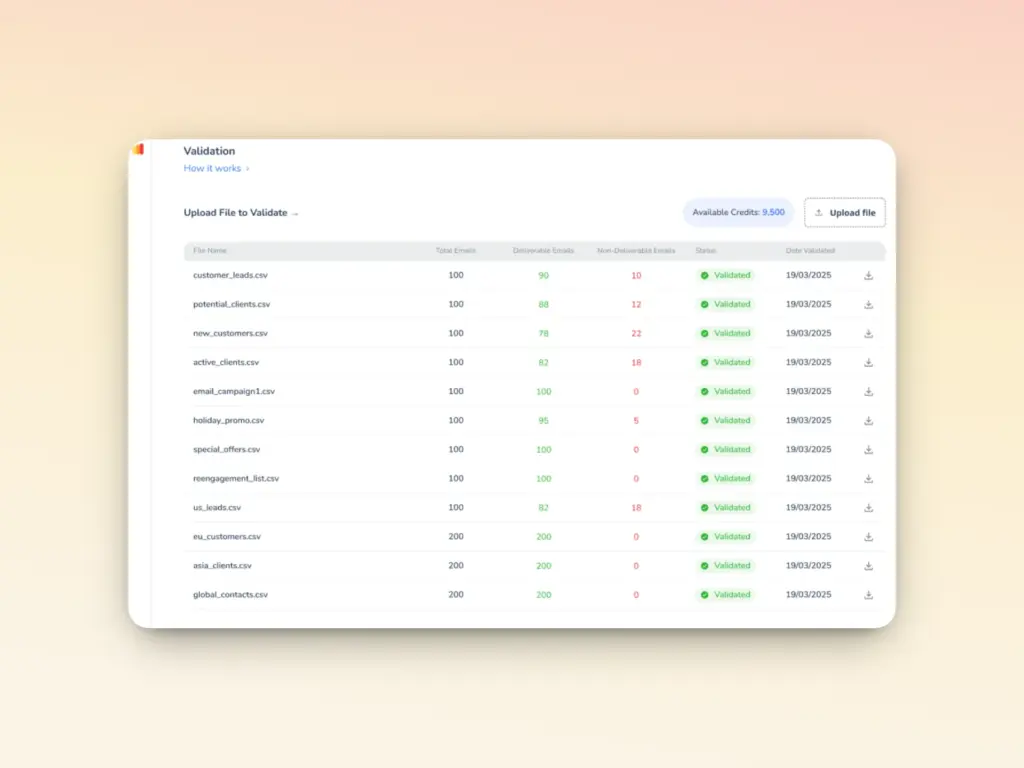
Warmy’s email validation tool identifies invalid addresses in your list so they don’t enter your sending pipeline in the first place. This means fewer SMTP 510 errors, fewer wasted sends, and lower bounce rates.
When you upload a list of email addresses, our tool assigns each one a score from 1 to 10, based on its deliverability status:
- Deliverable (score 6-10): These emails are safe to send.
- Non-deliverable (score 1-5): These emails may bounce or result in delivery issues.
Real-time monitoring and access to domain health
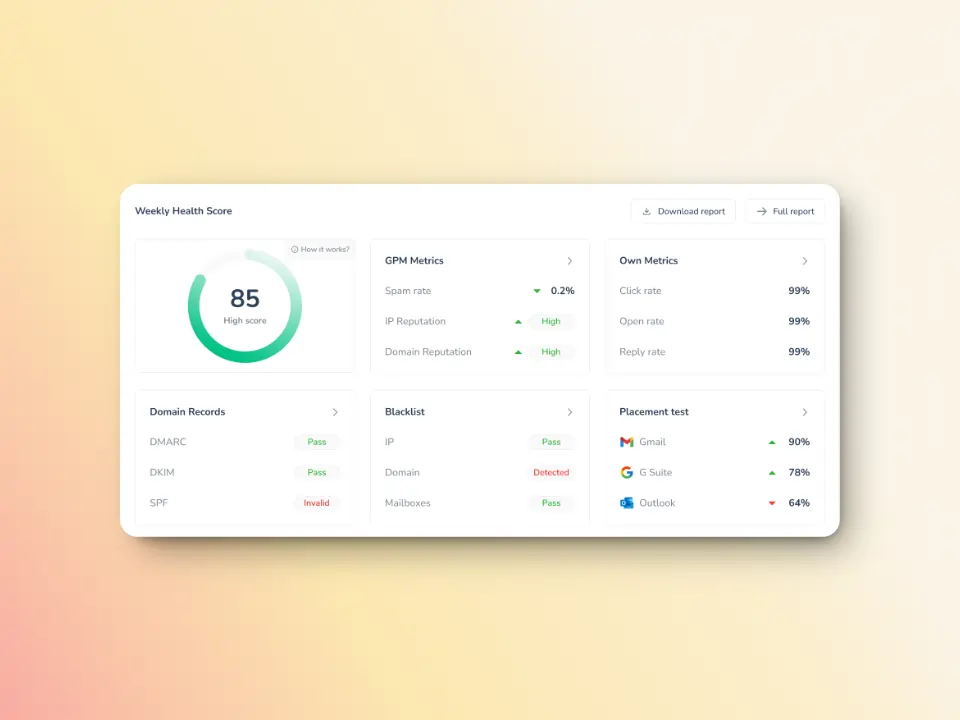
The domain health hub gives you an overall view of your domain health. If you’ve experienced SMTP Error 510 or other SMTP errors before, this dashboard will let you know your domain health:
- Domain health score based on deliverability factors like inbox placement test, DNS authentication, and Google Postmaster data
- Status of DNS records if they are valid and properly configured
- Spam rate trends, inbox placement, and overall deliverability performance with weekly or monthly tracking options
Reputation building via AI-powered warmup

Warmy’s AI-powered email warmup solution isn’t a validation tool, but it builds sender reputation gradually and organically. With better reputation, blacklists and anti-spam systems are less likely to treat your domain harshly even when occasional invalid addresses pop up. That means:
- Slight list impurities (like edge typos) are less likely to cause cascading deliverability issues
- You gain “trust capital” with ISPs that can protect you in edge cases
Scheduled deliverability tests
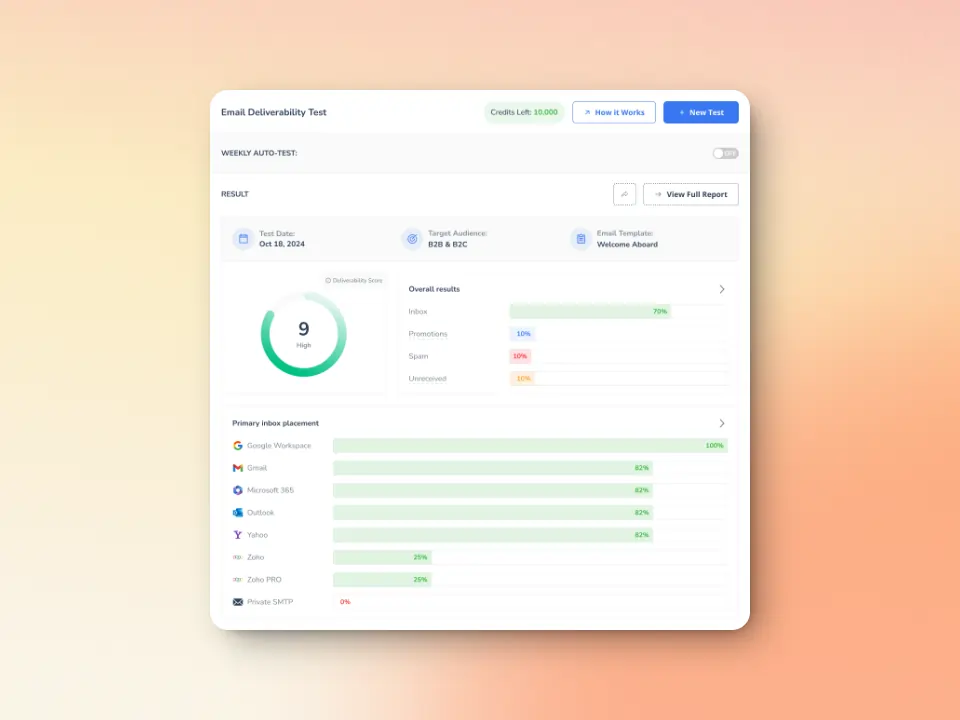
Warmy can run weekly deliverability assessments automatically to reveal underlying weaknesses in your sending setup. These tests include:
- Inbox placement checks
- Spam folder placement trends
- Delivery consistency across providers
While this doesn’t catch invalid addresses directly, it tells you how well your list hygiene and validation practices are performing in practice.
Try Warmy’s free inbox placement test to receive deliverability diagnostics and real feedback loops on where your emails land and how servers process it on the way.
Ready to eliminate SMTP errors and boost your email deliverability? Try Warmy for Free and boost your email performance!
FAQ
What is SMTP Error 510?
SMTP Error 510 is a permanent delivery failure caused by attempting to send to an invalid or non-existent email address.
Is SMTP Error 510 a temporary or permanent error?
SMTP Error 510 is a permanent error. It means the email address does not exist or is invalid, and retrying the send will never succeed. The only fix is correcting or removing the address.
What causes SMTP Error 510 – Bad email address?
SMTP Error 510 happens when senders attempt to send emails to invalid email addresses due to data collection errors, changes in job roles or companies, outdated contact information, abandoned inboxes, spam trap creation, or as a consequence of bad sending behavior.
Can SMTP Error 510 harm my email deliverability?
Yes. Repeated 510 errors damage your sender reputation, increase hard bounce rates, and raise red flags with ISPs and ESPs, which can lead to spam filtering, throttling, or blocking.
How can I prevent SMTP Error 510 in bulk email campaigns?
To prevent SMTP Error 510 in bulk campaigns, use real-time email validation, maintain regular list cleaning, implement double opt-in, monitor bounce rates, and use deliverability tools like Warmy to track domain health, validate emails, and protect sender reputation.