With several SMTP error codes and messages, many people find it challenging to determine if their email account or SMTP settings are on the right track.
Today’s article will help you steer the digital email highway, providing you with SMTP (Simple Mail Transfer Protocol) success codes—2xx responses that act as traffic lights and serve as your go-to indicators that your emails are on the right track.
Everything you need to know about SMTP Codes 200, 220, 221 and 250
In an sense, SMTP codes act as “traffic lights.” There are those that signify errors in the delivery process, but there are these success codes which are like green lights. Here’s what they generally mean:
- SMTP 220: “Service ready” – The server is prepared to start the conversation.
- SMTP 250: “Requested mail action okay, completed” – The action was successfully completed, and the session is progressing smoothly.
- SMTP 221: “Service closing transmission channel” – The server is ending the conversation, usually after successfully sending the email.
- SMTP 200: “OK” – A general acknowledgment that the server has received and processed the request.
Service-specific SMTP tweaks to guarantee SMTP green lights
While SMTP 2xx series success codes signify smooth sailing, the rare instances where action is required to fix underlying issues often vary by email service provider. Gmail, Outlook, and Yahoo have unique infrastructures, which means troubleshooting involves provider-specific steps.
Gmail
For Gmail users, fixing issues even after receiving 200, 220, 221 and 250 success codes generally involves checking the following:
- Check Filters and Blocked Addresses. Ensure your emails are not being filtered into different folders or blocked. You can review these settings in the ‘Filters and Blocked Addresses’ tab in Gmail settings.
- Less Secure App Access. If you’re using third-party email clients, ensure ‘Less Secure App Access’ is enabled in your Google Account settings. However, as security practices evolve, consider using OAuth for a more secure connection.
- Review Sending Limits. Gmail has sending limits to prevent spam. If you exceed these limits, your email may be temporarily unable to send. Google’s Support Page provides details on these limits.
Outlook
Outlook users may encounter different issues:
- Connection Settings. Verify that your Outlook is correctly configured with the SMTP settings recommended by your email provider. Details on the correct settings can typically be found in the ‘Mail Settings’ section of your account.
- Update Passwords and Authentication Methods. If you’ve recently changed your email password, make sure to update it in Outlook as well. Also, check that authentication methods match those required by your email server.
- Check Email Server Status. Occasionally, the Outlook email server may experience downtime. You can check the server status on Microsoft’s Service Health page.
Yahoo
Yahoo Mail requires its set of checks:
- SMTP Server Settings. Confirm that your email program is using the right SMTP settings for Yahoo Mail. These settings are available on Yahoo’s Help pages.
- App Passwords. If you’re using two-step verification or Account Key, you may need to generate a unique app password for your email client. This can be done from the ‘Account Security’ tab in your Yahoo account settings.
- Sending Limits and Spam Flags. Like Gmail, Yahoo imposes sending limits. Familiarize yourself with these, and if you’ve hit a limit, you’ll need to wait before sending more emails. Also, ensure your emails don’t trigger spam flags by adhering to best practices in content creation.
Acquire further email success with Warmy.io

Warmy.io offers a proactive approach to email management, reducing SMTP errors and boosting deliverability.
- Automated warm-up & reputation building. Elevates your email’s inbox placement using artificial intelligence so all of this happens in the background.
- Real-time alerts. Quickly flags deliverability issues.
- Service-specific recommendations. Enhances deliverability for Gmail, Outlook, and Yahoo.
Free email deliverability test
Beyond just monitoring, Warmy.io offers a free email deliverability test, allowing you to quickly gauge and enhance your email’s performance. This tool can be instrumental in identifying and resolving deliverability issues.
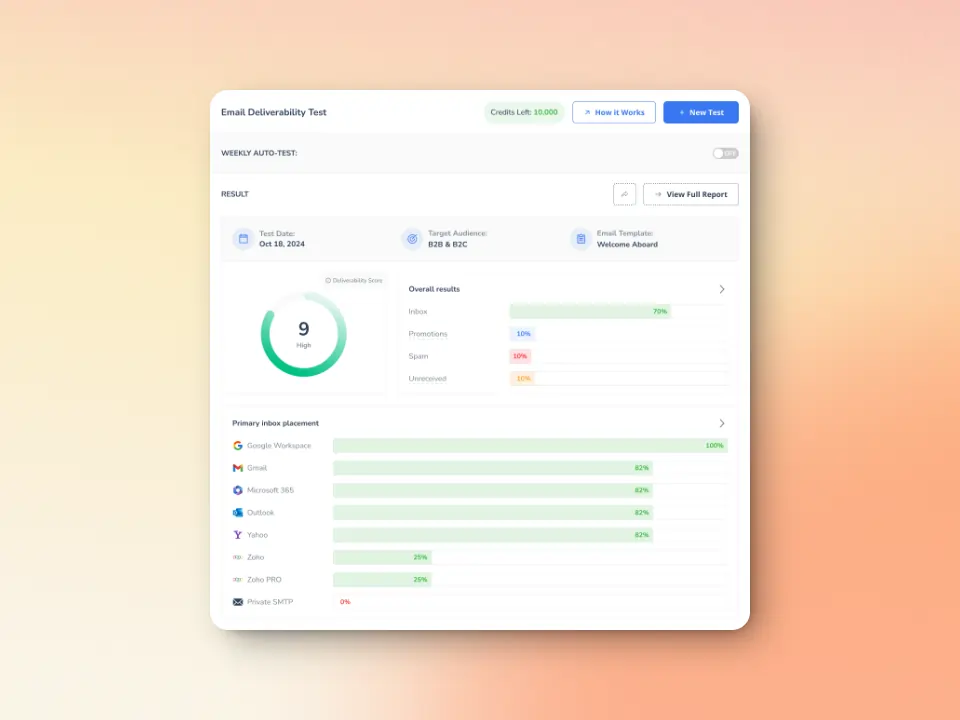
Getting started with Warmy.io is a breeze. Its user-friendly setup and dashboard are designed for efficiency, enabling swift integration into your email strategy without disrupting your workflow.
This ease of use facilitates ongoing adjustments and optimizations, ensuring your email performance continues to excel.
Maximize deliverability by understanding SMTP success codes
Understanding and monitoring SMTP success responses are critical. They reassure that your email campaigns are not just launched but are on the right trajectory to hit the inbox bullseye. This knowledge keeps you ahead in the email race, ensuring your messages dodge the spam folder and secure the attention they deserve.
Remember, the goal isn’t just to send emails. It’s to connect, engage, and convert. Keep a close eye on these SMTP success codes to maintain the health and efficiency of your email outreach.
Armed with this understanding and the right tools, you’re set to navigate the email landscape confidently, making SMTP 2xx codes a language you not only comprehend but also use to your strategic advantage. Remember, success in email communication isn’t just about avoiding errors—it’s about creating connections that drive results.
FAQ
What are SMTP 2xx success codes?
SMTP 2xx success codes are responses from an email server indicating that an email request has been successfully received, understood, and processed. Codes like 200, 220, 221, and 250 signal various stages of successful email transactions.
Why is it important to understand these SMTP codes?
Knowing these codes helps diagnose and ensure efficient email delivery. While they generally indicate success, understanding the nuances can help identify and resolve underlying issues that may affect email performance.
Can emails still face issues even if I receive a 2xx success code?
Yes, emails can still encounter deliverability problems due to content filtering, server configurations, or sending practices, even after a 2xx code is received.
How can I resolve issues related to these SMTP success codes?
Begin by reviewing your server settings, checking for network stability, and ensuring your email content adheres to best practices. For more specific issues, consider using tools like Warmy.io for automated assistance and optimization.
How does Warmy.io help with SMTP 2xx code issues?
Warmy.io offers email warm-up, real-time deliverability monitoring, and tailored sending recommendations. It also provides a free email deliverability test to identify and resolve potential issues proactively.
What is the significance of the SMTP 250 code?
The SMTP 250 code is particularly important as it signifies that the email has been accepted for delivery by the recipient’s server, marking a key step in successful email communication.
How often should I perform an email deliverability test with Warmy.io?
Regular testing is advised, especially after making changes to your email strategy, to continuously monitor and optimize email performance.
Can using Warmy.io prevent all email deliverability issues?
While Warmy.io significantly reduces the likelihood of deliverability problems by addressing common causes of email failure, it’s important to maintain best practices in email content and list management for the best results.