Key takeaways
- High-volume email warmup requires SPF, DKIM, and DMARC authentication, a clean list, and a dedicated sending domain before any warmup begins.
- Before any warmup begins, authentication records must be properly configured, your list must be clean, and warmup traffic should run separately from live campaigns.
- Not all warmup tools are built for scale. Choose a tool that supports: high daily send limits, AI-adaptive scheduling, multi-domain management, inbox placement testing, and ongoing blacklist monitoring.
- Warmy.io supports up to 5,000 warmup emails per day per inbox, adapts via its Adeline AI engine, and includes inbox placement testing, domain health monitoring, blacklist checks, and an agency dashboard—all from one platform.
- Warmup and deliverability are not a one-time setup. Ongoing monitoring and a continuous warmup baseline protect sender reputation as your program scales.
For high-volume senders, email deliverability is not just a minor technical concern you should be aware of. It is a revenue variable that is necessary—especially if you are in the business of sending thousands of emails a day.
A single email that tilts even the slightest into spam can affect your entire campaign, and eventually cause damage across your entire sending infrastructure. This makes email warmup a necessity as the process builds and establishes a solid sender reputation that ensures inbox placement.
This article covers the evaluation framework you need, the technical prerequisites that often get skipped, and how to choose a warmup solution that actually keeps pace with your volume.
Why high-volume email sending fails without proper warmup
Inbox providers (primarily Google, Microsoft, and Yahoo) treat new or suddenly scaling senders with heightened scrutiny. Sending large volume from a new domain, or rapidly increasing volume from an existing one, triggers automated spam filters. Legitimate senders get caught in these more often than most marketing teams realize.
The consequences show up fast:
- Inbox placement drops. Warmy’s State of Email Deliverability 2025 report found that the average global inbox placement rate sits at 83.5%. That means roughly 1 in 6 emails sent doesn’t even reach the inbox. For a business sending 50,000 emails per month, that’s over 8,000 messages going to spam or disappearing entirely
- Pipeline takes the hit. Deliverability problems don’t stay in the marketing dashboard. 64.6% of businesses report that deliverability issues have directly hurt revenue and customer retention.
- Authentication is now mandatory. In May 2025, Microsoft began enforcing authentication requirements for senders exceeding 5,000 emails per day to Outlook.com, requiring properly configured SPF, DKIM, and DMARC records. Google and Yahoo introduced similar requirements earlier. This is no longer optional for bulk senders.
- Scale adds complexity. A solo sender warming up one inbox follows a simple ramp schedule. An agency managing 30 client domains (each at a different warmup stage, with different ESP configurations and send volumes) is running a fundamentally different operation. The tooling needs to match that complexity.
How to choose the right email warmup tool for high-volume sending
One of the things you need to understand before you invest in a warmup tool is that some of them are not built for high-volume environments. In fact, finding one that fits your requirements may take some time but that is a time investment that you should consider. Here are some of the capabilities that you should consider.
|
Feature |
Basic Warmup Tools |
Warmy |
|
Daily warmup limit |
50–100 emails/inbox |
Up to 5,000/inbox |
|
AI-adaptive scheduling |
No |
Yes (Adeline AI) |
|
Multi-domain dashboard |
Limited/separate logins |
Unified agency dashboard and workspace management feature |
|
Inbox placement testing |
Rarely included |
Free email deliverability test available
Internal inbox placement test which can be set up to run automatically weekly |
|
Email health and blacklist monitoring |
Separate tool required |
Built-in with inbox placement testing |
|
Language support |
English only |
30+ languages |
|
Authentication tools |
Not included |
Free SPF and DMARC generators f |
- Daily warmup volume capacity. Many tools cap warmup at 50–100 emails per day per inbox. That ceiling is fine for a single new domain, but it creates a bottleneck when you’re onboarding multiple domains simultaneously or trying to maintain warmup activity alongside live campaigns. For high-volume senders, a max of 100 warmups a day is simply not enough.
- Multi-mailbox and multi-domain management. If you’re managing more than one domain (whether for your own business or on behalf of clients) you need a dashboard that consolidates visibility across all of them. Toggling between separate logins for each inbox is a liability.
- AI-adaptive warmup. Static ramp schedules treat every domain identically. Domains aren’t identical as they have different histories, different DNS configurations, and different starting reputations. An AI-driven warmup engine that adjusts sending pace based on real-time domain behavior will protect new inboxes from being pushed too hard and allow stronger domains to ramp faster.
- Inbox placement testing. Knowing your emails are being sent isn’t the same as knowing where they land. Placement tests across Gmail, Outlook, Yahoo, and other providers give you actual data on inbox vs. spam placement before campaigns go live.
- Email health monitoring and authentication tools. Blacklist monitoring, SPF/DKIM/DMARC checks, and domain health signals belong in the same platform as your warmup activity. Fragmented tooling creates blind spots.
- Workspace management functionality. Teams managing multiple clients need role-based access, client-level reporting, and the ability to operate across accounts without data bleeding between them.
- Language and provider support. International outreach programs require warmup activity in the target language to generate authentic-looking engagement signals. If you’re sending in German, French, or Japanese, your warmup tool should be able to match that.
The non-negotiables before any warmup begins
Warmup doesn’t fix a broken technical foundation, but it amplifies whatever is already there. Before warming any domain, confirm the following.
SPF, DKIM, and DMARC must be properly configured
These aren’t optional for high-volume senders under current inbox provider requirements. If you’re building records from scratch, Warmy offers a free SPF record generator and DMARC record generator that walk through the setup correctly.
Not sure your authentication is set up correctly? Run a free Email Deliverability Test.
You should be sending from a dedicated domain or subdomain
Your primary business domain or the one your team uses for day-to-day email should never be your cold outreach domain. A reputation problem on a sending subdomain is containable. The same problem on your root domain is not.
Your list is clean
Google and Yahoo require spam complaint rates below 0.3% and bounce rates kept well under 2%. Sending to a stale or unverified list at high volume will damage sender reputation faster than any warmup schedule can compensate for.
Warmy’s email deliverability roadmap outlines how to approach deliverability as a system rather than a checklist.
How Warmy is built for high-volume email senders
Warmy is an AI-driven email warmup platform purpose-built for high-volume senders and agencies that need inbox placement, domain health monitoring, and automated warmup across multiple domains. All from a single dashboard.
AI-driven email warmup with Adeline
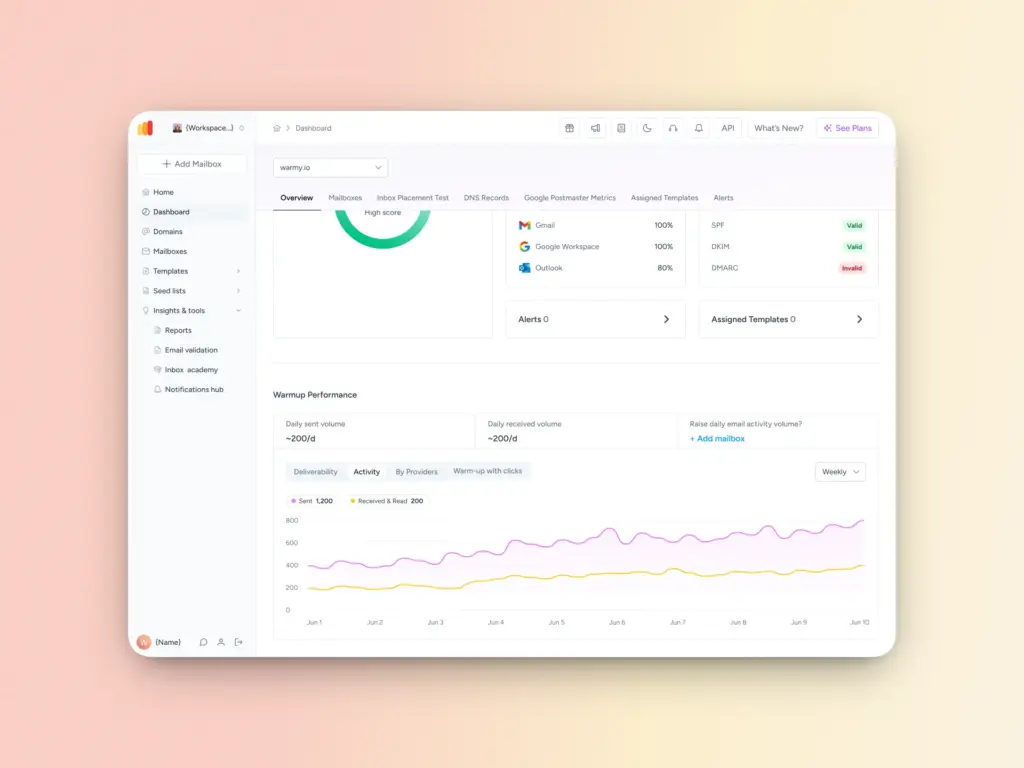
Up to 5,000 warmup emails per day
Warmy supports up to 5,000 warmup emails per day per inbox, which makes it the most robust tool for email warmup at scale. For senders managing multiple domains simultaneously or scaling aggressively, that ceiling matters. Most warmup tools cap out well below it.
Real mailboxes, real engagement signals
Warmy’s warmup network uses real email addresses, not bots or simulated accounts. Emails are opened, replied to, and interacted with by actual inboxes. These are the engagement signals — opens, replies, move-to-inbox actions — that inbox providers weigh most heavily when assessing sender reputation.
Inbox placement testing
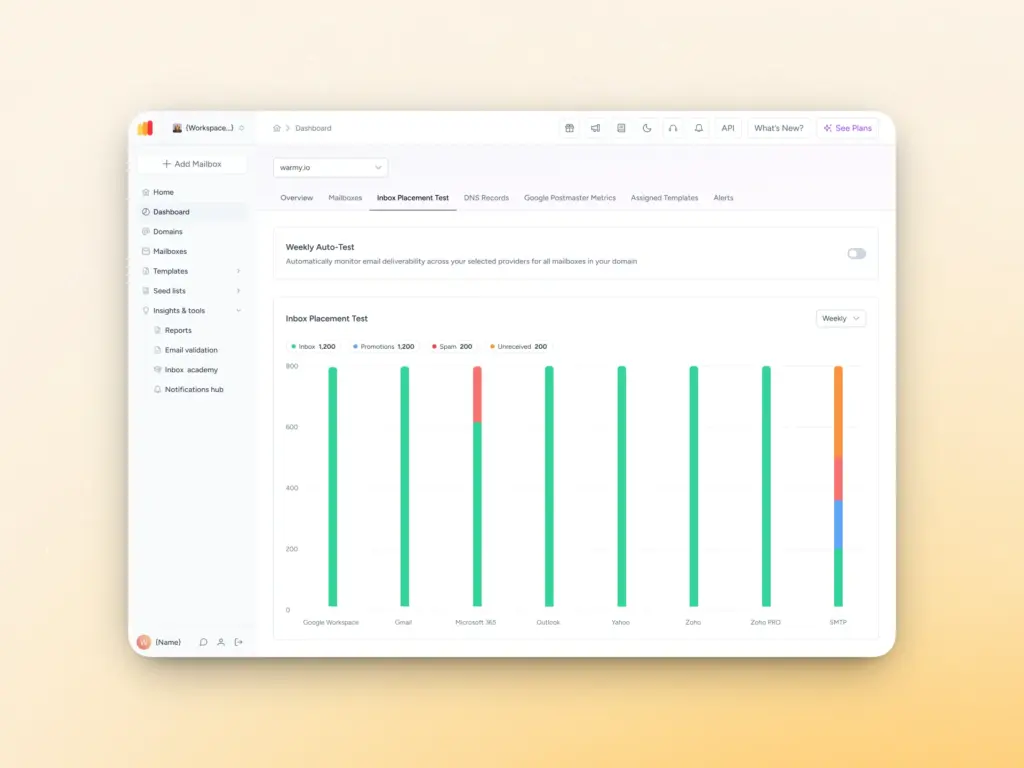
Before campaigns go live, Warmy runs placement tests across Gmail, Outlook, Yahoo, and other major providers. You get concrete data on where your emails are actually landing — inbox, spam, or promotions tab — rather than finding out after the fact through campaign metrics.
Domain Health Hub and Workspace Management feature
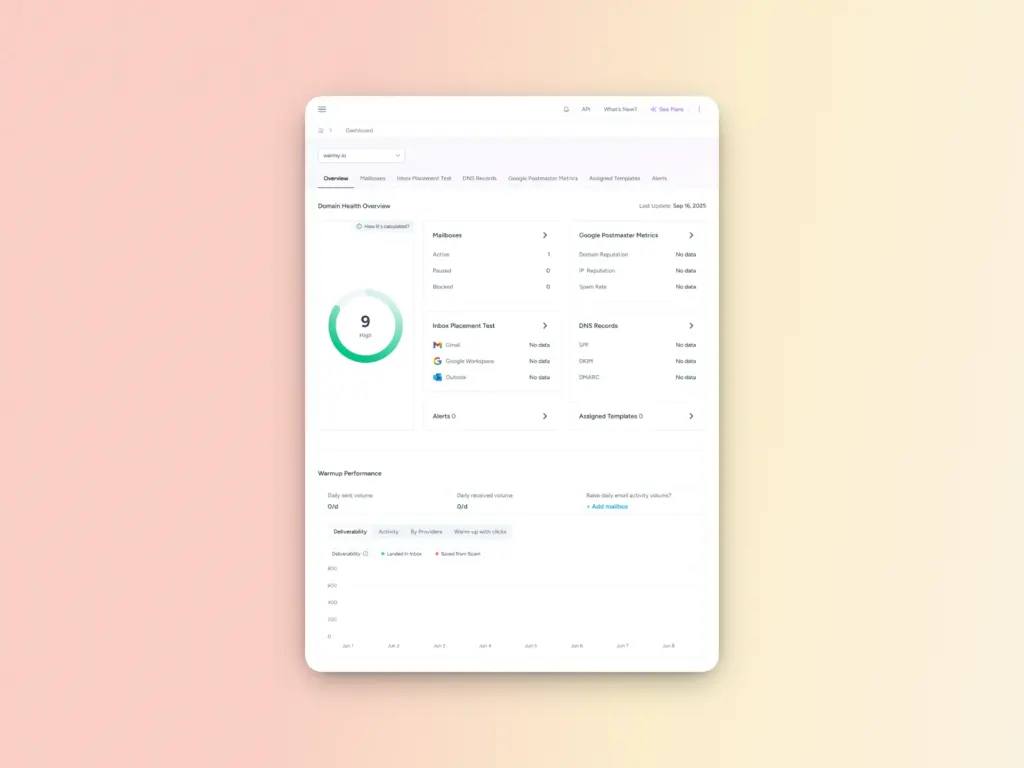
Warmy’s Domain Health Hub gives you a domain-level health score based on authentication status, blacklist checks, and inbox placement data. It includes:
- Weekly and monthly tracking for spam rate trends and overall deliverability performance
- DNS status checks for SPF, DKIM, DMARC, rDNS, MX, and A records
- Multi-domain monitoring from a single dashboard, so you can see at a glance which domains need immediate attention
This is ideal for high volume senders and agencies that are managing multiple domains.
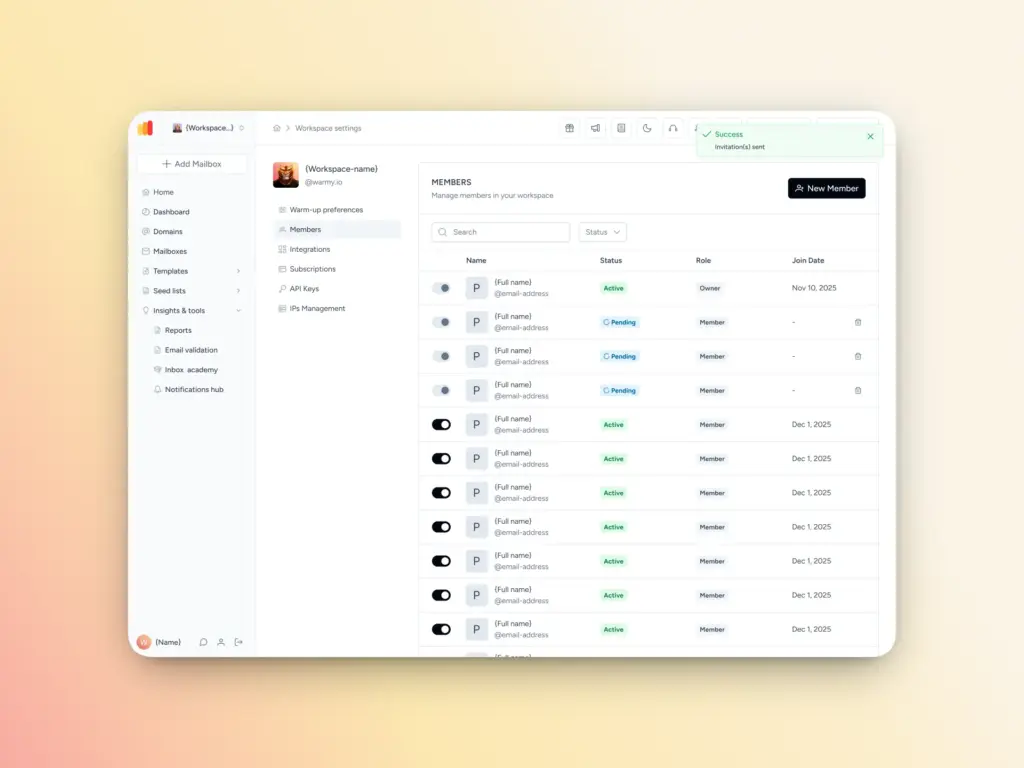
Meanwhile, the Workspace Management feature provides a single interface for managing multiple client mailboxes, with client-level visibility across warmup activity, health data, and placement results. No separate logins per account, no toggling between environments.
Blacklist monitoring
Continuous checks run against major blacklists. If your domain or sending IP appears on one, you’ll know before your live campaign metrics surface the problem and when there’s still time to act.
Related Reading: Email Blacklist Impact on Deliverability: How Gmail, Outlook & Yahoo Really Filter Senders
Authentication and free tools (available even before you sign up)
Warmy includes an SPF record generator, DMARC record generator, email template checker, and a free email deliverability test which are all available without a Warmy account. These are useful for assessing your current deliverability position before you commit to a tool or begin any warmup activity.
Google Postmaster Tools integration
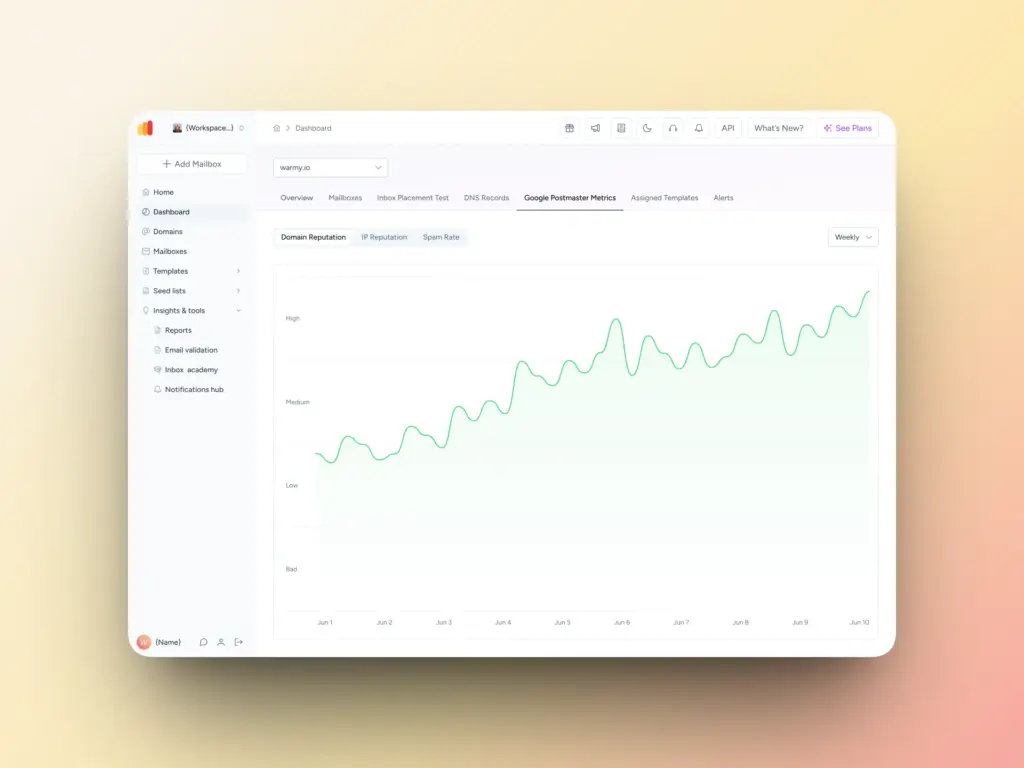
Warmy integrates with Google Postmaster Tools, so domain reputation signals from Gmail are tracked directly within the platform. No need to cross-reference a separate dashboard to understand how Google is interpreting your sending behavior.
Implement a warmup that fits into a broader deliverability strategy
Warmup establishes the foundation, but it isn’t a one-time event. Sender reputation is dynamic as it responds to sending behavior, list quality, complaint rates, and engagement patterns on an ongoing basis.
Deliverability monitoring should be ongoing, not a one-off troubleshooting task when something goes wrong. Blacklist checks, authentication audits, placement tests, and complaint rate reviews need to happen regularly and not just when something goes wrong. By the time a deliverability problem is visible in campaign metrics, it’s already been developing for some time.
Start your free trial with Warmy today and start scaling your outreach and growing your pipeline.
FAQ
How long does email warmup take for high-volume senders?
Most domains require four to eight weeks of consistent warmup before they can reliably support high-volume sends. The timeline depends on domain age, starting reputation, and the sending volume you’re working toward. Domains with prior sending history may ramp faster; brand-new domains typically need the full window.
Can you warm up multiple mailboxes at the same time?
Yes. Platforms like Warmy support concurrent warmup across multiple inboxes and domains from a single dashboard. Each inbox follows its own warmup schedule, and volume capacity is applied per inbox — so running ten inboxes simultaneously doesn’t reduce the daily limit available to each one.
What is the difference between automated and manual warmup?
Manual warmup means sending individual emails yourself to build reputation incrementally — time-intensive and difficult to scale beyond a handful of inboxes. Automated warmup tools run the warmup process in the background using a network of real inboxes that open, reply to, and engage with your emails. AI-driven tools go further by adjusting the ramp pace based on real-time signals from your domain rather than following a fixed schedule.
How many warmup emails per day do I need?
The right daily warmup volume depends on your target sending volume. As a general principle, warmup emails should represent a meaningful portion of your planned daily send during the ramp period. Starting at 10–20 per day and increasing by 20–40% weekly is a common baseline, but the specifics depend on your domain and target volume.
Does warmup work for Outlook and Gmail differently?
Outlook and Gmail use different filtering systems and reputation signals. Outlook places significant weight on authentication (SPF, DKIM, DMARC), which is now a hard requirement for senders above 5,000 emails/day. Gmail emphasizes engagement signals — opens, replies, and move-to-inbox actions. A warmup tool that tests placement across both providers and runs engagement across their networks will address both sets of signals.
What happens if I skip warmup and send at high volume immediately?
Inbox providers interpret a sudden high-volume send from an unestablished domain as a strong spam signal. Emails get routed to spam, or blocked entirely. Once a domain’s reputation is damaged, recovery takes longer than the original warmup would have. In some cases, the damage is severe enough that replacing the domain is faster than rehabilitating it.
Does Warmy work for agencies managing multiple clients?
Yes. Warmy includes an Agency Dashboard designed for teams managing multiple client mailboxes from a single interface. Each client’s warmup activity, health data, and placement results are visible without requiring separate logins per account. The platform also supports white-labeling for agencies that need to present reporting under their own brand.