TL;DR:
Warming up inboxes at scale means simultaneously managing volume ramp up, engagement signals, authentication, and monitoring across multiple mailboxes or domains. Manual warmup fails beyond 3–5 inboxes. Here’s how to warm up inboxes at scale:
- Set up SPF, DKIM, and DMARC on every domain before warmup begins.
- Ramp up sending volume for each inbox gradually: start at 10–20 emails/day, scale to 150+ over 4–5 weeks.
- Generate real engagement signals (opens, replies, spam recovery) for every inbox throughout warmup.
- Monitor placement, blacklist status, and spam complaint rates across all inboxes centrally.
Use an automated tool (like Warmy.io) as manual warmup is difficult to manage beyond 3–5 inboxes.
Never stop warming up. Ongoing warmup maintains sender reputation after the initial period.
You have 30 inboxes to warm up for a campaign launching in three weeks. You know the process for one inbox. But doing it for 30 simultaneously and consistently (without missing a step) is a completely different challenge.
Email warmup for one inbox is a process. But to warm up multiple inboxes? It’s an infrastructure and operational issue.
This guide covers exactly what changes when you need to warm up multiple mailboxes, domains, or client accounts. We’ll also discuss why the tools and habits that work for a single inbox stop working the moment you try to multiply them. You will also get a practical ramp-up schedule, a monitoring checklist, and a clear picture of what automated warmup looks like when it is done right.
What does “warming up inboxes at scale” actually mean?
Email warmup is the process of gradually increasing sending volume from a new or dormant mailbox so that inbox providers like Gmail, Outlook, and Yahoo learn to trust it. Sending too much, too fast, too soon from an unknown domain can trigger spam filters and send you to blacklists before your audience ever sees your message.
Warming up inboxes at scale means managing that volume ramp-up, engagement signal generation, authentication verification, and deliverability monitoring across multiple mailboxes or domains simultaneously.
So instead of a single sender reputation to protect, you have to manage dozens. These can be at different stages with each inbox requiring consistent attention.
The core challenge is not technical complexity per inbox. It is operational complexity across all of them effectively. One missed step on inbox 14 out of 30 can damage reputation across a shared domain or IP pool. One bad actor in a group of inboxes can penalize the whole campaign.
Why does manual warmup break down at scale?
Manual warmup is manageable for one or two inboxes. It becomes operationally impossible beyond three to five.
Here’s the math:
- Warming up a single inbox requires daily monitoring, consistent sending volume, spam folder checks, engagement tracking, and authentication verification.
- If you have 20 inboxes, it’s like multiplying the workload by 20 without multiplying your team.
The real problems emerge in three areas:
- The amount of time needed. Each inbox needs individual attention every day during ramp-up. At 20 inboxes, a single ops person would probably spend their entire working day just on warmup tasks before touching any actual cold email outreach.
- Risks posed by inconsistencies. Human processes drift. One inbox gets ramped too fast. Another gets skipped for a day. A domain authentication setting is misconfigured on inbox #7 and nobody catches it. These inconsistencies eventually pile up into deliverability failures. Inconsistency in warmup is more dangerous than no warmup at all, because it creates a false sense of readiness.
- Opportunity cost. Every day an inbox is not ready is a day your campaign is delayed. For agencies and SDR teams, a campaign that is two weeks late to launch is direct revenue lost.
See the difference automated warmup works. Try Warmy for free today.
The four components of a scalable warmup process
Regardless if you’re warming up 5 inboxes or 50 or 500, the same four components determine success.
1. Authentication foundation (SPF, DKIM, DMARC)
- Authentication is not optional. Gmail and Yahoo both require DMARC alignment as a baseline condition for delivery. SPF and DKIM must be correctly configured before warmup begins, not after you notice deliverability problems.
- At scale, the risk is that one misconfigured domain slips through. When you are managing 10 or 20 domains, verifying each one manually is error-prone. Automated warmup platforms check authentication status as part of onboarding and surface issues before ramp-up starts.
- Use Warmy’s free SPF Generator and DMARC Generator to configure these records correctly before warming up any new domain.
- If you need a deeper reference, the email authentication guide (SPF, DKIM, DMARC) covers the complete setup.
2. Gradual sending volume ramp-up
- Every inbox provider reviews and assesses sending patterns to assess a sender’s trustworthiness.
- A brand new domain that sends 500 emails on day one comes across as a major red flag. Meanwhile, a domain that starts at 15 emails per day and steadily increases over four weeks comes across as a legitimate sender.
- The principle is simple. It is a best practice to start low, increase incrementally, never spike. Specific numbers depend on domain age, prior domain reputation, and engagement rates but the direction is always gradual. A sample ramp schedule is included in the next section for week-by-week guidance.
- Email warmup at scale means you need every inbox following its own appropriate ramp pace simultaneously. There is no one-size-fits-all schedule.
3. Engagement signal generation
- Inbox providers do not just watch volume. They watch what recipients do with the emails they receive.
- Opens, replies, and moving emails out of spam are positive signals in the email deliverability roadmap. These behaviors show mailbox providers that you are sending content your recipients find relevant.
- Emails being deleted without being opened, spam complaints, and bounces are negative signals. When this happens to senders often, ESPs will be suspicious and may treat them more warily.
- When you scale email warmup, it can be difficult to encourage real engagement at scale. This requires sending warmup emails to a network of real or near-real mailboxes that interact with them naturally. Doing this manually for one inbox is tedious enough. Doing it for 30 is not realistic.
- Automated email warmup can greatly help warm up multiple inboxes at the same time.
4. Continuous monitoring and tracking
- Warmup is not a set-and-forget process. You need to track inbox placement rates, blacklist status, bounce rates, and spam complaint rates across every inbox, every day.
- At scale, this requires a unified view. Checking 30 individual inboxes separately is the same operational problem as warming them up manually—it is entirely not scalable.
- Warmy’s free inbox placement testing shows you where your emails actually land (inbox, spam, or promotions tab) across major providers. Not sure where your emails are landing right now? Run a free Email Deliverability Test.
Suggested warmup ramp schedule for scale
The table below is a general framework. Actual pace should adjust based on domain age, existing reputation, and real-time engagement signals. Automated tools like Warmy.io adjust these parameters dynamically per inbox via Adeline AI.
Week | Emails per day per inbox | Focus | Key risk |
Week 1 | 10–20 | Authentication & baseline signals | Triggering spam filters with unknown domain |
Week 2 | 20–40 | Engagement rate building (opens, replies) | Inconsistent engagement across inboxes |
Week 3 | 40–80 | Spam folder recovery, volume increase | Volume spike if not graduated carefully |
Week 4 | 80–150 | Near-production sending volume | Complaint rate exceeding 0.3% threshold |
Week 5+ | 150–200+ | Maintain & monitor; begin cold outreach | Reputation decay if warmup stops entirely |
A few important notes on this schedule:
- Do not apply the same pace to bulk inbox warmup regardless of domain history. A six-month-old domain with prior sending activity can ramp faster than a domain registered last week.
- Do not start cold outreach campaigns until warmup is complete. Mixing warmup traffic with campaign traffic before the inbox is ready is one of the most common causes of deliverability failure.
- Week 5+ warmup does not stop. Ongoing low-level warmup activity maintains reputation, especially for inboxes used heavily for cold outreach.
A quick note on AI-powered email warmup
Warmy.io’s Adeline AI email warmup analyzes per-domain signals in real time and adjusts the ramp pace automatically. If an inbox is gaining engagement faster than expected, the schedule accelerates. If signals are weak, it slows down. This removes the guesswork that makes manual warmup unreliable at scale.
See how Warmy manages warmup across multiple inboxes. Book a demo.
How automated warmup tools handle scale
Manual warmup has a ceiling. At some point, it is bound to be too much to handle. Meanwhile, automated warmup platforms were built specifically to remove that ceiling.
Here is what automated email warmup tools can handle that manual processes cannot:
- Parallel ramp-up across hundreds of inboxes and domains. Every mailbox runs its own domain warmup schedule simultaneously, with no additional human effort per inbox added.
- AI-driven schedule adjustment. Instead of applying a fixed ramp schedule, the tool reads per-inbox signals and adjusts in real time. A domain gaining strong engagement early can move faster. One showing spam placement risks slows down.
- Engagement signals and spam folder recovery. Automated tools can help facilitate positive behaviors like opening emails, reading, and replying. Automated warmup networks can also detect when warmup emails land in spam and interact with them to move them to the inbox. This trains the provider that emails from this sender belong in the inbox.
- Unified monitoring. Instead of checking each inbox separately, you get a single dashboard showing placement rates, reputation scores, blacklist status, and ramp progress across all inboxes.
The Warmy approach: built to scale deliverability
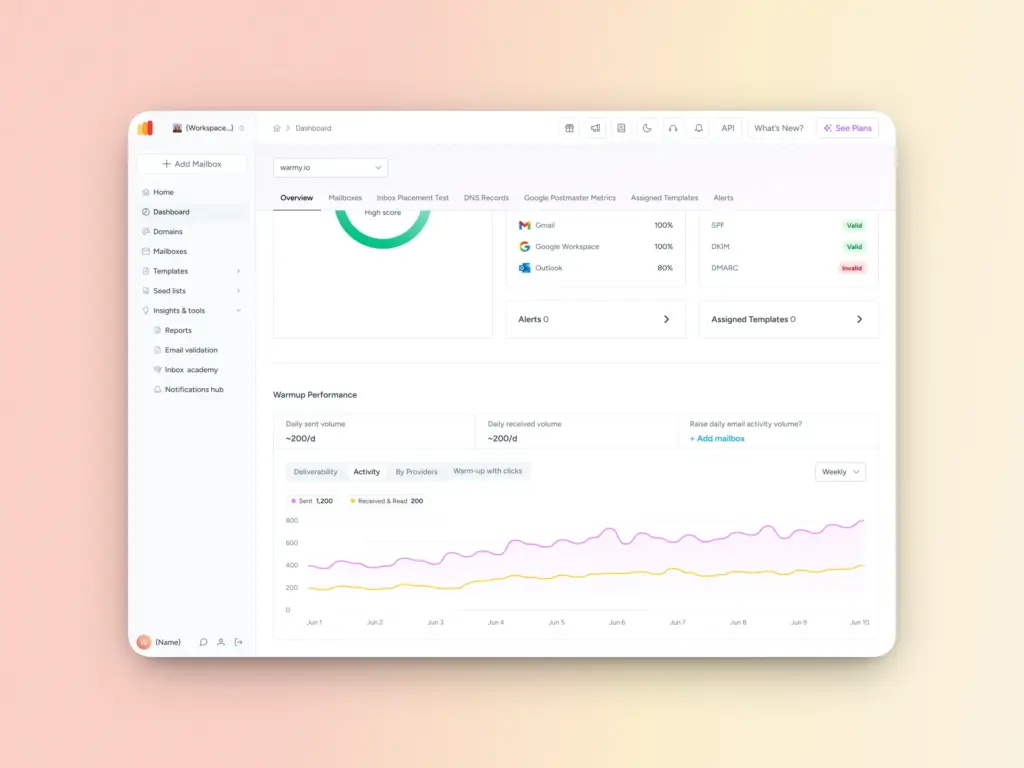
Warmy.io is an AI-driven email warmup platform built to warm up multiple email accounts at the same time. Its proprietary AI, Adeline, analyzes signals and dynamically adjusts warmup pace for each mailbox. It supports Gmail, Outlook, Yahoo, SMTP, and custom email providers. Additionally, the warmup provided is robust as it can be customized according to language (over 30 to choose from), topic, distribution across providers, and engagement patterns.
Warmup with Clicks: engagement that matters
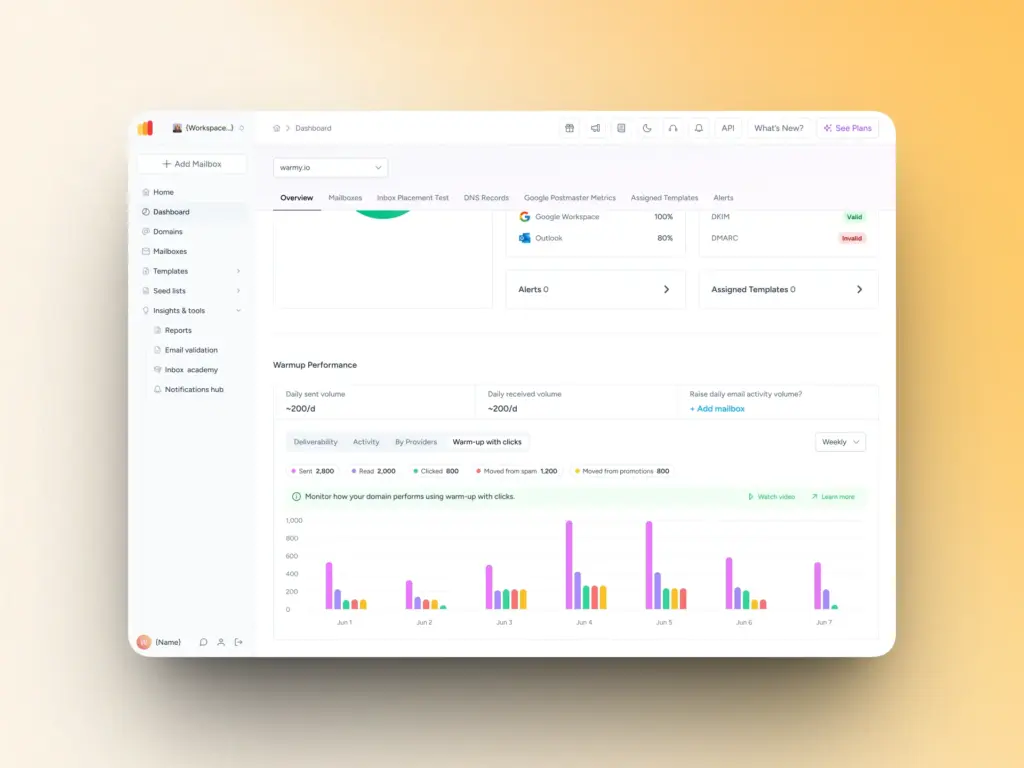
Most warmup tools stop at ramping up sending volume and generating opens. Warmup with Clicks goes further. When a warmup email lands in an inbox, it is opened, links inside are clicked, and a reply is generated in the thread. If the email lands in the spam folder (or Promotions) first, it is retrieved, moved to the inbox, and marked as important all automatically.
These interactions are the positive signals inbox providers use to assess sender quality. At scale, generating them manually across dozens of inboxes is not feasible. Warmup with Clicks handles all of this automatically and behind the scenes. No manual list downloads, no ESP uploads, no tracking spreadsheets. Every inbox in your stack benefits from the same quality of engagement signals, simultaneously.
Workspace management for teams managing warmup at scale
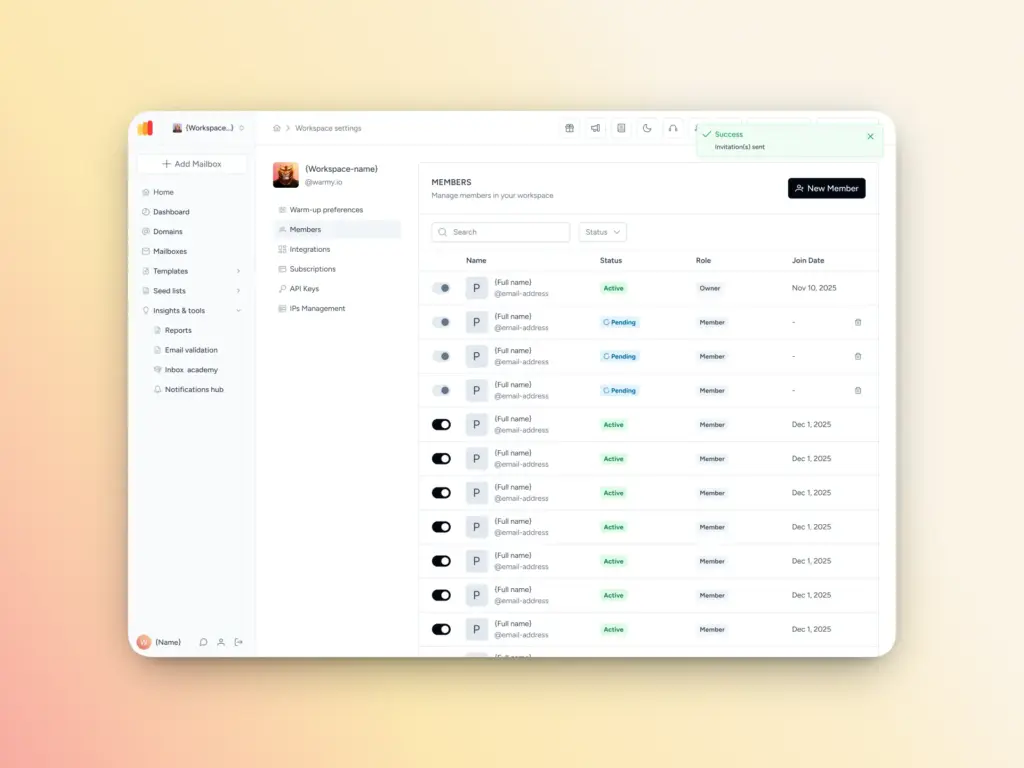
For agencies and teams managing multiple warmups, Warmy’s Workspace Management feature lets you manage warmups across dozens of client mailboxes from a single interface, with separate reporting per client account. This removes the operational bottleneck that makes scaling warmup for agencies so difficult.
Inbox placement, domain health, and blacklist monitoring at scale
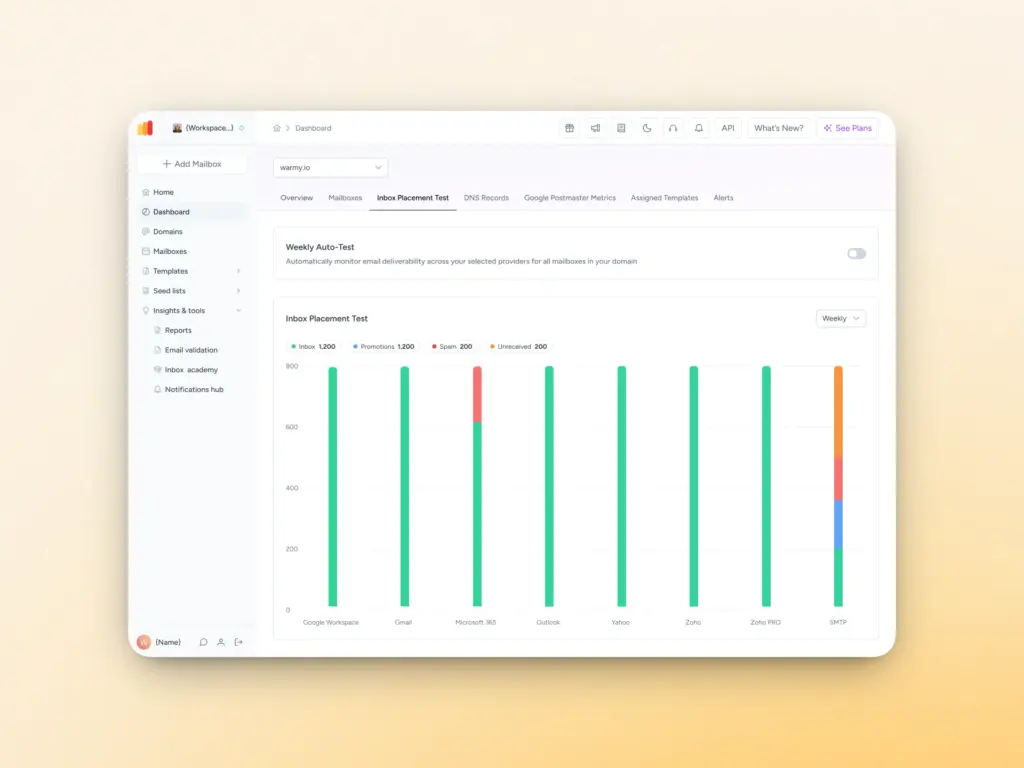
Warmy’s monitoring dashboard gives you a real-time health score per domain, tracking improving inbox placement rates, blacklist status, bounce rates, and spam complaint levels across all your mailboxes in one view. It also integrates directly with Google Postmaster to surface domain and IP reputation data as Gmail sees it, not just what your sending platform reports.
At scale, this matters because problems do not announce themselves. A domain can start accumulating spam complaints days before your campaign metrics reflect it. Continuous monitoring with automated alerts catches these signals early, before they compound into a deliverability crisis that takes weeks to recover from.
You can also run on-demand placement tests to see exactly where your emails land (inbox, spam, or promotions tab) broken down by provider (Gmail, Outlook, Yahoo).
Common mistakes when scaling email warmup
Most deliverability problems during scaled warmup come from the same handful of mistakes. Knowing them in advance is the easiest way to avoid them.
- Ramping all inboxes at the same pace. A two-year-old domain with prior sending history is not the same as one registered last week. Applying a uniform schedule across both ignores the risk differential and will likely cause the newer domain to flag.
- Starting outreach and skipping warmup. The most common mistake. Warmup and campaign sending are not the same traffic type. Mixing them before the inbox has established reputation accelerates complaint rates and can undo weeks of warmup progress.
- Ignoring provider-specific placement data. Gmail and Outlook behave differently. An inbox may achieve strong Gmail placement while still landing in Outlook’s junk folder. Monitoring needs to be per-provider, not aggregate.
- Skipping authentication. When scaling, teams often rush secondary domains into warmup without verifying SPF, DKIM, and DMARC. Google’s Sender Guidelines require DMARC alignment for senders sending over 5,000 messages per day to Gmail. Yahoo has parallel requirements. Missing authentication on a single domain in your stack creates a weak link that can affect overall campaign performance.
- Not monitoring spam complaint rates. Gmail and Yahoo both require spam complaint rates below 0.3% to avoid enforcement action, with a target below 0.1%. At scale, complaint rate spikes can happen faster than a manual monitoring process catches them. Automated alerting is not optional. It is absolutely necessary.
Ready to warm up at scale without the guesswork?
With only a single inbox, warmup is a process you can manage manually just fine. But as you scale, it becomes an infrastructure and operational challenge. It requires consistent execution across every domain, every day, without room for the inconsistencies that human processes introduce.
The answer is not to work harder and spend more time conducting manual warmup. It is to use tools built specifically for this environment to scale safely.
Warmy.io’s AI-driven warmup solution manages per-inbox ramp schedules, generates real engagement signals, monitors placement across providers, and even gives teams a single dashboard to oversee every mailbox.
So if you are managing multiple inboxes and doing warmup manually, you are spending time on a problem that should be automated. And you are accepting risks you do not need to carry.
If you’re ready to warm up at scale while cutting down on time spent, sign up for your free 7-day trial of Warmy today
FAQ
How long does inbox warmup take at scale?
Most inboxes require 3–8 weeks to warm up, depending on domain age, engagement rates, and existing reputation. At scale, the timeline per inbox does not change, but automation allows all inboxes to ramp concurrently. A team warming up 30 inboxes with an automated tool does not take 30x longer than warming up one; all 30 run in parallel.
How many inboxes can be warmed up simultaneously?
With automated tools, there is no practical ceiling. Warmy.io supports agencies and outbound teams managing hundreds of mailboxes simultaneously. Manual methods become impractical and unreliable beyond three to five inboxes.
Does warmup work the same way for Gmail and Outlook?
Both require gradual volume increases and engagement signals, but provider-specific placement behavior differs. Gmail tends to be more responsive to engagement signals; Outlook has its own filtering logic that sometimes requires different calibration. Warmy allows users to set custom distribution by provider to address each one directly rather than treating all providers the same.
Do I need to keep warming up after the initial period?
Yes. Warmup is not a one-time event. Ongoing low-level warmup activity maintains sender reputation, which decays over time, especially for inboxes used heavily for cold outreach. Cold email inboxes face ongoing spam complaint risk that requires continued positive signal generation to offset.
What is the risk of warming up too fast?
Inbox providers may flag the domain as suspicious, leading to increased spam folder placement, blacklisting, or account suspension. Gmail and Yahoo both enforce spam complaint rate thresholds — above 0.3% triggers active enforcement. Recovery from a blacklisted domain can take weeks and may require domain replacement entirely.