


We’ve released a new set of API v2 endpoints that give developers and technical users significantly more control over how they manage mailboxes, warmup behavior, statistics, and domain data inside Warmy.
These additions are particularly relevant for customers who embed Warmy into their own platforms, build internal monitoring tools, or automate deliverability operations at scale.
This article provides a complete breakdown of what’s new.
What’s new in Warmy API v2?
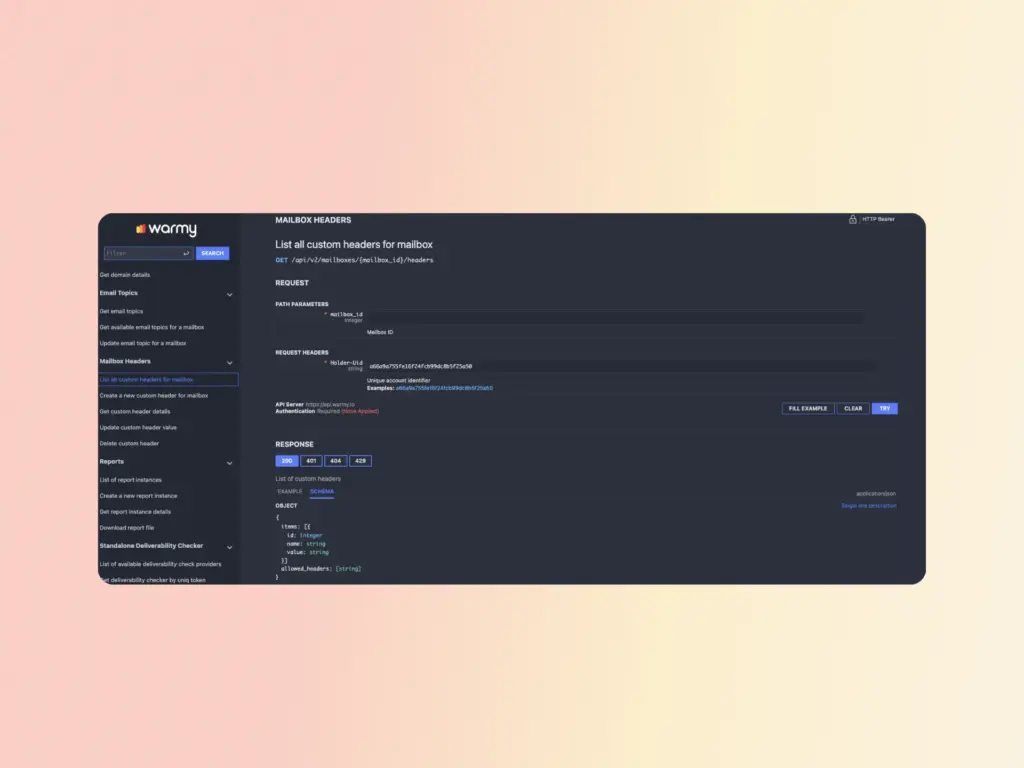
1. Mailbox header endpoints
We’ve added a dedicated Mailbox Headers section to the API documentation with these endpoints:
- POST: Create a new custom header for a mailbox
- GET: List all custom headers configured for a mailbox
- GET: Retrieve details for a specific header
- PUT: Update an existing header value
- DELETE: Remove a header from a mailbox
One notable addition here is support for the Feedback-ID header. This header is used in Gmail’s Feedback Loop (FBL), which allows large-volume senders to identify which campaigns or traffic segments are generating spam complaints and respond faster to deliverability issues.
Google’s documentation on Feedback-ID and how it works with Gmail’s FBL is available here.
These endpoints are designed primarily for high-volume senders who need to track complaints at the campaign level and act on that data programmatically.
2. Available warmup email topics
A new endpoint lets you programmatically retrieve all available warmup email topics: GET /api/v2/email_topics
This allows you to fetch the full list of available topics and use them when configuring mailbox warmup settings via API, without having to reference the dashboard manually.
3. Warmup statistics by provider
You can now pull warmup performance data broken down by date and email provider for any mailbox. The endpoint supports the following time periods:
- today
- yesterday
- week (last 7 days)
- month (last month)
- quarter (last 3 months)
- year (last year)
This makes it possible to track how warmup performance varies across providers over time and feed that data directly into your own dashboards and analytics tools.
4. Warmup preferences (balancing) at mailbox level
A new set of endpoints lets you manage warmup preferences per mailbox:
- GET: Retrieve current warmup preferences for a mailbox
- PUT: Update warmup balancing options for a mailbox
- GET: List available providers for warmup preferences
- GET: List excluded providers for a mailbox
The excluded providers endpoint is particularly useful: it returns providers that Warmy’s system has automatically removed from warmup for a specific mailbox due to detected sending issues or alerts.
This gives teams precise control over how warmup traffic is distributed and makes it easier to respond to provider-specific problems without manual intervention inside the dashboard.
Full documentation on setting up balancing preferences at the sender level is available in the Warmy Knowledge Base.
5. User template statistics
Two new endpoints provide warmup performance data for your user templates:
- Total statistics across all providers
- Statistics broken down by provider (with optional filtering for specific templates)
This lets you compare how different templates perform during warmup and build internal reporting views that track per-template and per-provider performance over time.
6. Seed List performance statistics
You can now retrieve Seed List performance data via API v2:
- Total statistics across all Seedlist providers and senders
- Filtered statistics for a specific sender and Seedlist provider
This makes it straightforward to monitor Seedlist performance programmatically rather than checking the dashboard manually.
7. Get list of domains
A new endpoint returns a list of all your domains with the same statistics and metrics visible on the Domains page in the Warmy dashboard, including current data.
This allows you to keep external systems in sync with your Warmy domain data without logging into the interface.
8. Get domain details
A separate endpoint returns detailed information for a specific domain, including:
- Domain health scores
- DNS records
- Mailbox statistics
- Placement checker results
- Google Postmaster data
This is designed for automated deliverability monitoring at the domain level and for internal tools that need a single, reliable source of domain health data.
What this API release means in practice
These endpoints extend the Warmy API in two specific directions:
- More granular control over warmup behavior (headers, providers, balancing preferences)
- Richer data access (statistics across templates, Seedlists, and domains).
For teams managing warmup at scale or building internal platforms on top of Warmy, this release removes several common blockers: the need to check excluded providers manually, the inability to pull per-template warmup performance, and the lack of programmatic domain health data.
What’s next?
The next set of API additions is already in development:
- Endpoints to generate deliverability reports at the mailbox and domain level in XLSX and PDF formats
- The ability to assign specific warmup topics to individual mailboxes via API
Start building with Warmy API v2
If you’re integrating Warmy into your own platform or building custom automations, the updated API documentation covers all new endpoints in detail.
Start your free trial to get access, or book a demo if you’d like to walk through integration options with our team.
FAQ
Who are these API v2 endpoints designed for?
They are designed for developers, technical teams, and agencies who integrate Warmy into their own systems or build custom automations. They are particularly relevant for large-volume senders who need programmatic access to warmup data and configuration.
What is the Feedback-ID header and why does it matter?
Feedback-ID is a header used with Gmail’s Feedback Loop (FBL). It allows senders to identify which campaigns or traffic segments are generating spam complaints and respond faster. Warmy’s API now supports creating and managing this header at the mailbox level.
Can I use the API to manage warmup preferences without going into the dashboard?
Yes. The new warmup preferences endpoints allow you to retrieve and update warmup balancing options per mailbox entirely via API.
Where can I find documentation for these endpoints?
The updated API documentation is available inside your Warmy account. You can also reference the balancing preferences guide and Seedlist statistics documentation in the Warmy Knowledge Base.
What formats will deliverability reports be available in?
The upcoming report generation endpoints will support XLSX and PDF formats.




