Warmy’s release of the Warmup With Clicks Statistics is a gamechanger. This dedicated statistics chart for Warmup With Clicks enables users to:
- Get clarity and transparency on what’s happening during the warmup process, in clear, trackable metrics.
- Track performance of Warmup With Clicks on a domain level and mailbox level
- Track the five core performance metrics of Warmup With Clicks: number of emails sent, moved from spam, moved from Promotions, opened, and number of clicks linked
- Make decisions based on data and patterns through early detection and email warmup analytics
Here’s what’s new, what you can track, how to access this feature, and why this visibility matters for your sender reputation and email deliverability.
What’s new: Warmup with Clicks statistics
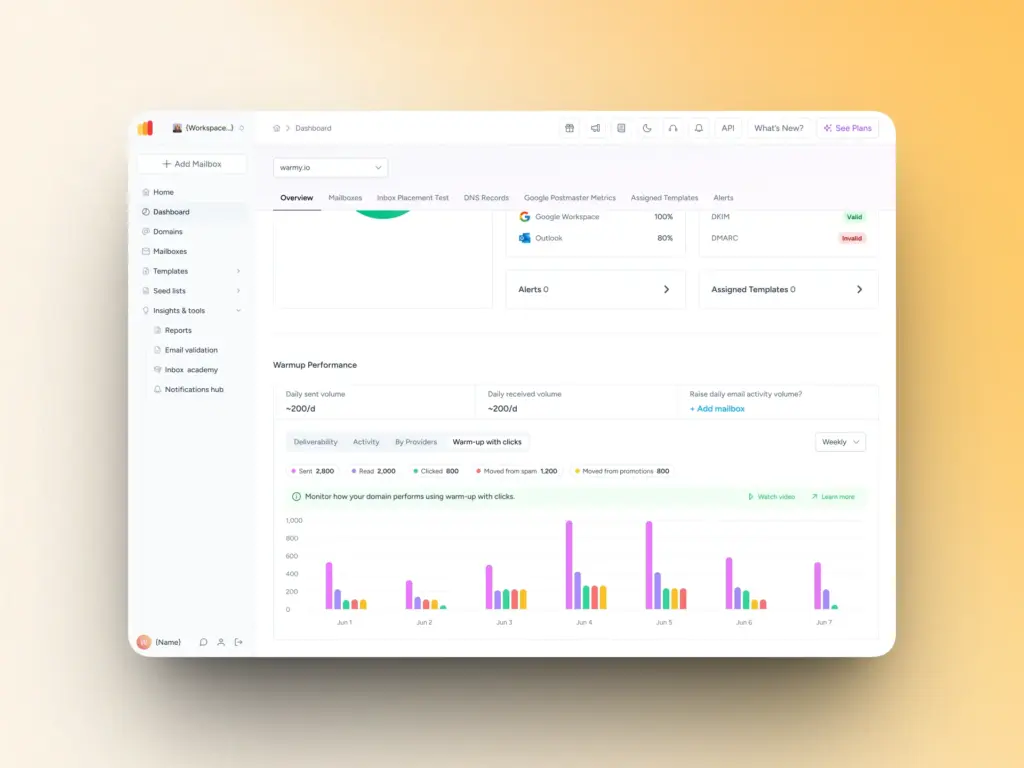
The Warmup with Clicks feature is a powerful approach to email warmup that simulates real engagement through automated opens and link clicks, without requiring manual management of external seed lists or continuously tracking split updates manually.
Since ESPs prioritize engagement signals over consistent delivery, using Warmup With Clicks on top of Warmy’s automated email warmup results in a holistic, continuous, and sustainable deliverability strategy:
- Automated email warmup provides essential actions like opening emails, recovering emails from spam and moving them to the inbox, marking them as important, and sending replies.
- Warmup With Clicks provides more sophisticated and progressive email warmup analytics of engagement patterns such as clicks and removing emails that land in the Promotions tab (for Gmail).
The new analytics layer adds a dedicated chart called “Warmup with Clicks” that surfaces performance data directly in your Warmy account. These statistics are now available on two key pages:
- Domain dashboard: an aggregated view of warmup performance across all mailboxes on a domain
- Mailbox dashboard: a granular view of warmup performance for each individual mailbox
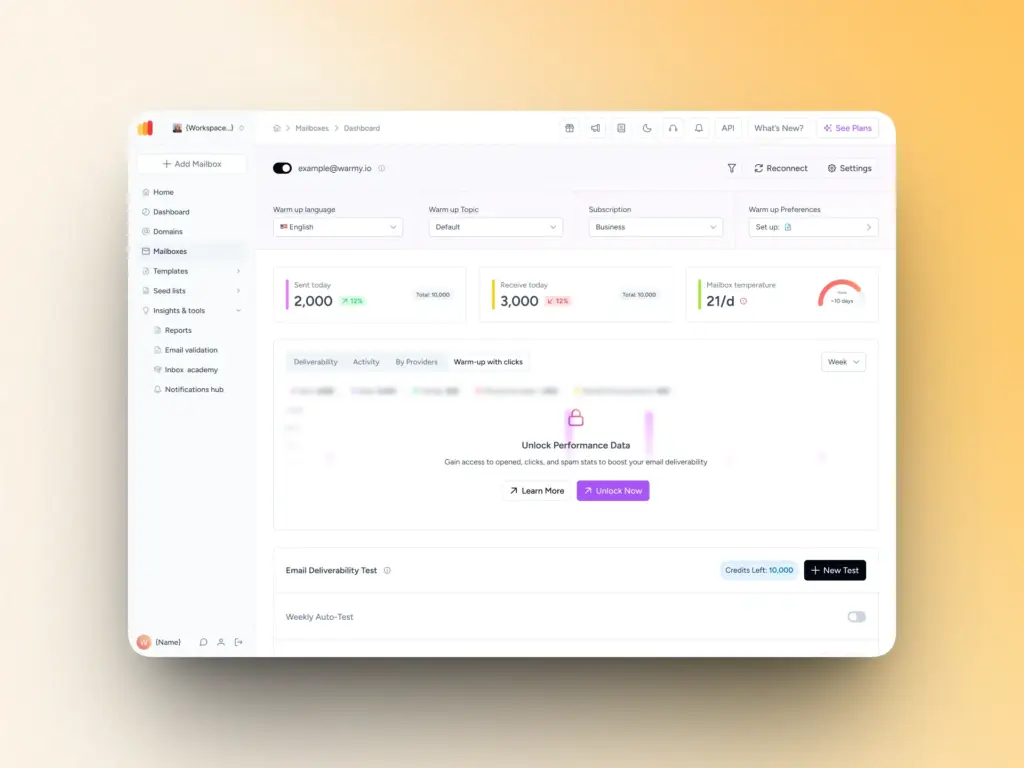
Users who have access to the Warmup with Clicks feature will see the full statistics chart. Users who don’t yet have access will see a brief explanation of the feature and a prompt to contact support for more information or to request access.
Key metrics you can now track for Warmup with Clicks
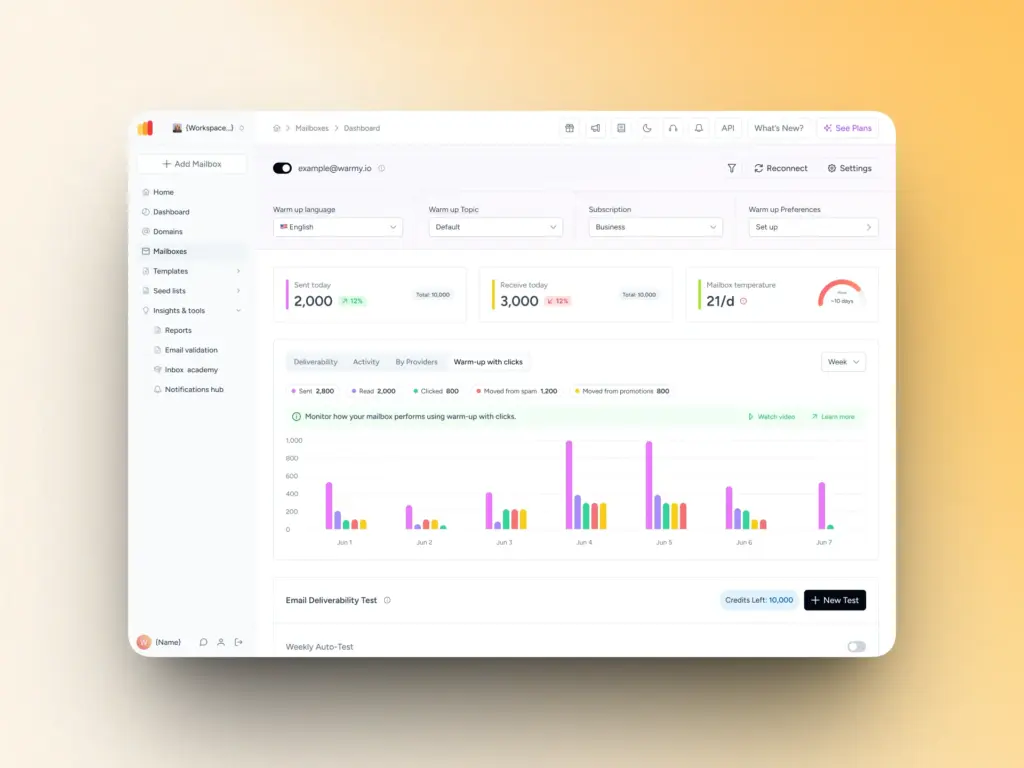
The Warmup with Clicks analytics chart tracks five core seedlist performance metrics. Together, these email warmup statistics give you a complete picture of how your warmup is progressing.
- Number of emails sent: This shows the total volume of emails dispatched to the internal seedlist during the warmup process. It gives you a baseline to measure all other metrics against and confirms that your warmup activity is running as expected.
- Emails moved from spam: One of the most valuable signals in the chart. This metric tracks how many warmup emails were initially delivered to the spam folder and then moved to the inbox. Inbox placement recovery is a direct indicator of improving sender reputation — the more emails are rescued from spam, the stronger the signal to mailbox providers that your emails are legitimate.
- Emails moved from Promotions: For senders using Google Workspace or Gmail-based mailboxes, emails landing in the Promotions tab rather than the primary inbox can be a concern. This metric shows how many warmup emails were moved out of Promotions, helping you gauge how your domain is being classified.
- Number of opened emails: Tracks how many warmup emails were opened by seedlist recipients. Opens are a key engagement signal that mailbox providers use to assess sender reputation. Consistent open activity during warmup builds a positive sending history.
- Number of clicked links: Link clicks represent a deeper level of engagement than opens alone. This metric tracks how many links within warmup emails were clicked by seedlist recipients, providing a stronger positive signal to receiving mail servers.
Important note on clicks vs. opens: You may notice that your click count is significantly higher than your open count which is expected behavior. Depending on the number of links in your warmup email template, clicks can be up to 3x higher than opens. This is why tracking both metrics independently gives you a more accurate picture of warmup performance than either metric alone.
Why accessing Warmup with Clicks Statistics matters for your sender reputation
Regardless of how robust the tool is, it’s crucial for senders to have ready access to your data to make informed decisions about your email deliverability strategy:
- Transparency into the Warmup With Clicks results. Previously, users of Warmy’s internal seedlist (Warmup with Clicks) had no way to monitor key events. The new analytics chart fills this gap by providing real-time visibility into exactly what’s happening at every stage.
- Data-driven decision making: With specific metrics in hand, you can identify patterns and issues early. If spam recovery numbers drop or open rates stall, you have concrete data to investigate right away.
- Reduced dependency on support: Previously, users had to contact the Warmy support team to verify how Warmup with Clicks was progressing. The analytics chart puts that information in your hands, so you can self-serve status checks and spend your time on strategy instead of troubleshooting.
Already have access to Warmup with Clicks? Log in and navigate to your mailbox dashboard or domain dashboard to view your analytics now.
How to access Warmup With Clicks Statistics
Accessing the statistics is straightforward:
- Once logged into your Warmy account, navigate to either your domain dashboard for a high-level view, or your mailbox dashboard for per-mailbox performance data.
- Look for the “Warmup with Clicks” chart section on either page.
- When reading the chart, focus on trends over time rather than individual data points. A healthy warmup will show a gradual increase in activity across all metrics as the warmup volume ramps up.
Here are a few specific things to watch for:
- Spam recovery activity: Emails being moved from spam confirms that the warmup process is actively building inbox placement reputation.
- Open and click consistency: Both metrics should increase in parallel with sending volume. Sudden drops may indicate a deliverability issue worth investigating.
- Clicks vs. opens ratio: Clicks may appear higher than opens depending on your email template. This is normal and expected, not a data error.
If you don’t see the Warmup with Clicks chart in your dashboard, this means your account doesn’t have access to the feature yet. Simply contact our support team to request access details.
What this means for your email deliverability strategy
Access to granular warmup data changes how you can approach email deliverability management. Rather than treating warmup as a black box, you now have the ability to monitor your sender reputation development actively.
With the Warmup with Clicks analytics chart, you can identify potential issues early, before they affect your live sending campaigns. If spam recovery rates are lower than expected, or if opens decline unexpectedly, you have the data to investigate and address the problem proactively.
Over time, the chart gives you an overview of your deliverability improvement. Tracking metrics across days and weeks lets you see the concrete impact of your warmup investment and make more confident decisions about when your mailbox is ready for higher sending volumes. Get started with data-driven deliverability today
The Warmup with Clicks analytics feature is available now for users with access to the Warmup with Clicks feature.
For current users using Warmup with Clicks, simply log in and go to your mailbox dashboard or domain dashboard to view your Warmup with Clicks statistics.
New to Warmy? Start your free trial to explore Warmy’s email warmup tools including Warmup with Clicks.
FAQ
Where can I see my Warmup with Clicks analytics?
Warmup with Clicks statistics are available on two pages within your Warmy account: the domain dashboard (for a domain-wide view) and the mailbox dashboard (for individual mailbox performance). Look for the “Warmup with Clicks” chart on either page.
What metrics are tracked in the analytics chart?
The chart tracks five metrics: number of emails sent, number of emails moved from spam, number of emails moved from promotions, number of opened emails, and number of clicked links.
Why are my clicks higher than my opens?
This is expected behavior. Depending on the number of links in your warmup email template, click counts can be up to 3x higher than open counts. Each link in the template can be clicked independently, which means a single email open can generate multiple click events. Tracking both metrics separately is important for this reason.
I don’t see the Warmup with Clicks analytics in my dashboard. Why not?
Access to Warmup with Clicks analytics is tied to access to the Warmup with Clicks feature itself. If you don’t see the chart, your account may not yet have access. You’ll see a brief feature explanation in its place. Contact Warmy support to ask about accessing the feature on your plan.
Are the statistics available for both domain and mailbox levels?
Yes. The Warmup with Clicks statistics chart is available on both the domain dashboard page and the mailbox dashboard page, giving you flexibility to monitor performance at whichever level is most relevant to your workflow.