



TL;DR: SMTP errors 446, 447, and 449 all block outgoing mail, but for different reasons. 446 almost always signals a mail loop, where a message bounced between servers until it hit a hop-count ceiling. 447 means the message expired in the sending queue after repeated temporary delivery failures. 449 is a legacy Microsoft Exchange routing failure, usually a broken connector or a deleted routing group. None of the three are official RFC 5321 reply codes; they are labels that mail tools attach to underlying enhanced status codes, and the right fix depends on which one you are actually looking at.
The basic foundation for sending emails over the internet is called Simple Mail Transfer Protocol, or SMTP. Email servers send, receive, and relay outgoing mails between senders and recipients using this standard protocol. This method not only guarantees that your emails go to the people you want them to, but it also takes care of any mistakes that could happen during the email transmission.
SMTP errors interrupt that process, and each code points to a different point of failure. They matter because they cause lost messages, delayed communications, and, when they recur, real damage to sender reputation. This guide focuses on codes 446, 447, and 449, which all relate to routing and forwarding rather than content or authentication. For a complete reference to every SMTP reply and enhanced status code, see Warmy’s SMTP error codes and messages glossary.
What are SMTP email errors 446, 447, 449
Codes 446, 447, and 449 are labels that mail servers, admin panels, and monitoring tools attach to specific delivery failures. None of them is an official three-digit reply code defined in RFC 5321; each maps to a broader enhanced status code, and knowing that mapping is what actually tells you which system to go fix.
SMTP Email Error 446
Error 446 indicates that the email sending was delayed and not yet delivered, due to issues on the receiving server or a network routing problem. The server is temporarily unable to deliver your message but will keep trying.
It is not an RFC 5321 reply code; the real bounce your server logs will show is a permanent 554 5.4.6 (on-premises Exchange) or 5.4.14 (Exchange Online), both carrying the enhanced status code X.4.6, “routing loop detected,” as defined in RFC 3463. That matters because a routing loop is a permanent failure, not a temporary one: simply waiting and letting the server retry will not fix it.
Users will typically see a message stating,
“554 5.4.6 Hop count exceeded – possible mail loop,”
or
“5.4.14 Hop count exceeded – possible mail loop ATTR34.”
SMTP Email Error 447
This error occurs when the sender sends an email, but it fails to be delivered within the expected time frame. This is often due to the email being sent to a server that was unable to process it quickly enough, possibly because of heavy traffic or server performance issues.
The user might receive a notification like,
“Your message could not be delivered within the specified time,”
or
“Delivery timeout reached, message not delivered.”
SMTP Email Error 449
“449” is not a standard SMTP reply code either. It is a routing error generated internally by Microsoft Exchange Server and reported in a non-delivery report, mapping to the RFC 3463 4.4.x network-and-routing class. In practice it shows up on legacy on-premises Exchange 2000/2003, which used routing groups and link-state routing; Exchange 2007 and later, and Exchange Online, replaced that system with Active Directory site-topology routing, so the same underlying failure now surfaces as 451 4.4.0 DNS query failed instead. See Microsoft’s NDR troubleshooting guidance for the current codes.
The error message could read,
“The requested action cannot be taken due to a routing error,”
or
“Routing error, message not sent.”
Error 446, 447, 449 in SMTP Email Common Causes
SMTP Email Error 446: Queued Mail for Delivery
- A Forwarding Loop. Mailbox A auto-forwards to B and B forwards back to A, or an auto-forward rule points at an address that loops back to its own source. Each hop stamps a new Received header, and once the count crosses the server’s ceiling, delivery is aborted.
- MX or Accepted-Domain Misconfiguration. If the recipient domain is not set up as an authoritative accepted domain on the receiving system, the message ricochets between servers instead of landing in a mailbox.
- Hybrid Connector Misconfiguration. In hybrid Exchange/Microsoft 365 setups, an inbound connector using DNS routing instead of a smart host, or a missing or over-scoped outbound on-premises connector, can send mail bouncing between the two environments.
- Server Timeouts. This error often occurs when the recipient server cannot process the email quickly enough, possibly due to server performance issues or high volumes of email traffic.
- DNS or MX Resolution Problems. If your server cannot resolve the recipient’s MX record, every attempt fails the same way until the message expires in the queue. This is a queue-expiry issue, not a size problem; a message rejected outright for being too large returns a different code, covered in SMTP Email Error 552.
- Resource Limitations. Inadequate server resources, such as memory or processing power, can lead to longer processing times, resulting in timeouts.
SMTP Email Error 449: Routing Error
- A Deleted Routing Group. The recipient was a member of a routing group that no longer exists, so Exchange keeps trying to route to a destination that isn’t there.
- SMTP Connector Misconfiguration. A connector configured to use DNS without a smart host, combined with a non-SMTP address space, has no valid next hop to route through. This is a routing failure, not a policy block; if a message is instead rejected outright for a content or reputation reason, that shows up as SMTP Error 554 instead.
- DNS Issues. Problems with Domain Name System (DNS) resolution, which affects how email addresses are translated into server IP addresses, can also result in routing errors.
Step-by-step solutions to resolve SMTP email error 446, 447, 449
SMTP Email Error 446 (Queued Mail for Delivery)
Initial Wait and Retry. Often, SMTP Error 446 resolves on its own as the email server retries the delivery. Wait a few hours, then attempt to resend your email.
Network Diagnostics. Run network diagnostics to check the stability and speed of your connection. Tools like
pingandtraceroutecan help identify network latency or instability. Use commands like:ping yourmailserver.comtraceroute yourmailserver.com
- Audit Forwarding Rules and Accepted Domains. Check mailbox forwarding, transport rules, distribution-list memberships, and aliases for a rule that sends mail back toward its source, and confirm the recipient domain is set up as an authoritative accepted domain on the receiving system.
💡 Pro Tip: Don’t raise your hop-count limit to “fix” 446. Most platforms don’t expose that setting, and even where they do, a higher ceiling only delays the same bounce. Find and break the loop instead.
SMTP Email Error 447 (Timeout Exceeded)
Compress Attachments. Before sending large files, compress them using tools like WinRAR or 7-Zip, or use cloud services like Google Drive or Dropbox and send a link instead.
Adjust Client Timeout Settings:
- Outlook: Go to
File > Account Settings > Account Settings > Double click on your account > More Settings > Advancedand increase the server timeout slider. - Other Clients: Look for similar settings in your email client’s advanced settings menu.
- Outlook: Go to
Contact ISP. If the problem persists, contact your Internet Service Provider to inquire about possible bandwidth or service issues that could be impacting your email sending capabilities.
💡 Pro Tip: A 4.4.7 report is a symptom, not the root cause. The original transient error, usually a DNS failure, connection timeout, or recipient-server throttling, is normally quoted right alongside it in the same NDR. Fix that, not the timestamp.
SMTP Email Error 449 (Routing Error)
Check the Routing Table (Legacy Exchange): On Exchange 2000/2003, Microsoft’s WinRoute utility reads the link-state routing table and exposes the dangling connector or deleted routing group. Re-home or remove the affected recipient once you find it. This step doesn’t apply to Exchange 2007 or later, or to Exchange Online.
DNS Configuration Check: Use DNS lookup tools like MXToolbox to check your domain’s MX records and ensure they are correctly pointing to your email server.
- Access MXToolbox
- Enter your domain and select MX Lookup to verify your MX records.
Consult Network Administrator: If you manage an internal or private email server, ask your administrator to check whether an SMTP connector is set to use DNS without a smart host on a non-SMTP address space. Pointing it at a valid smart host, or correcting the address space, resolves the routing failure directly.
💡 Pro Tip: If you’re on Exchange 2007 or later, or on Exchange Online, you won’t see a literal “449.” The equivalent routing failure on modern systems is reported as 451 4.4.0 DNS query failed, so search your logs for that code instead.
Fixed the routing issue but still seeing errors pile up? Recurring 446, 447, and 449 errors are often a symptom of weak sender reputation, since poorly warmed domains get throttled and greylisted more aggressively than trusted ones. Start your free Warmy.io trial and build the reputation that keeps your mail flowing on the first attempt.
Utilizing email warm-up services
Using a specialist service like Warmy.io can be quite beneficial for handling recurrent SMTP email issues like 446, 447, and 449. These services are made to solve typical problems that cause SMTP errors, therefore increasing the dependability and efficiency of email systems.
Enhancing Email Deliverability with Warmy.io
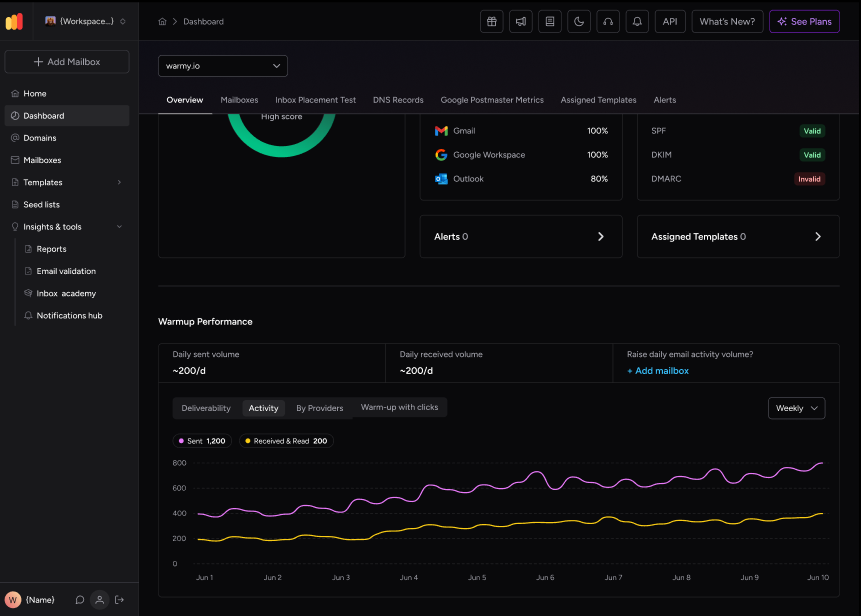
Email Warm-Up. Warmy.io’s email warm-up feature automatically sends out a number of emails that gradually increases over time, helping to build a positive sender reputation with ISPs. This is particularly helpful for new email accounts or after changes to email infrastructure.
Blacklist Monitoring. Warmy.io monitors various blacklists to ensure that your email domain or IP isn’t listed. Being on a blacklist can drastically affect your deliverability and is often a hidden cause of repeated SMTP errors. Use a free email deliverability test to see any blacklists your domain may be on.
Email Authentication Tools, Warmy.io provides tools to generate and manage essential email authentication records like SPF (Sender Policy Framework) and DMARC (Domain-based Message Authentication, Reporting, and Conformance). Proper configuration of these records is crucial for preventing email spoofing and ensuring emails are not rejected by recipient servers.
DNS Test, Additionally, Warmy.io includes a DNS test in the admin panel, allowing users to quickly verify that their domain’s DNS settings are correctly configured for optimal email delivery. This feature helps diagnose issues that could lead to routing errors (SMTP Error 449).
Consulting with an Email Deliverability Consultant

Consulting with an email deliverability consultant through Warmy.io can provide tailored advice for complex issues and strategic guidance to enhance your overall email system performance. These experts can help troubleshoot persistent SMTP errors, refine your email strategy, and ensure that your email setup is optimized to reduce the likelihood of delivery issues.
Conclusion
Critical business relationships as well as workflow efficiency can be seriously hampered by SMTP errors like 446, 447, and 449. Emails must be promptly resolved to reach their intended recipients in order to preserve the professionalism and dependability that are anticipated in digital communication.
Using professional tools and consulting services like Warmy.io is strongly recommended to enhance the health and efficiency of your email systems. Warmy.io provides a robust set of features designed to improve email deliverability, including email warm-up processes, blacklist monitoring, and essential email authentication tools such as SPF and DMARC record generators.
In summary, for any organization relying on email as a crucial communication tool, investing in a service like Warmy.io is a wise decision. It not only helps in troubleshooting and resolving current SMTP errors but also plays a crucial role in preventing future issues, ensuring that your email system operates smoothly and efficiently at all times.
Want a second set of eyes on your setup before the next 446, 447, or 449 shows up? Book a free demo with Warmy.io and walk through your domain health, routing setup, and warm-up strategy with the team.











