



SMTP success codes 200, 220, 221, and 250 confirm your email server accepted and processed the message without protocol errors. SMTP 220 means the server is ready; 250 confirms the message was accepted for delivery; 221 closes the session cleanly; and 200 is a general acknowledgment. These 2xx codes are green lights — they do not guarantee inbox placement, but they confirm no protocol-level failures are blocking your mail.
With several SMTP error codes and messages, many people find it challenging to determine if their email account or SMTP settings are on the right track. If you encounter error codes too, our SMTP error codes reference covers the full spectrum of failure responses and how to resolve them.
Today’s article will help you steer the digital email highway, providing you with SMTP (Simple Mail Transfer Protocol) success codes—2xx responses that act as traffic lights and serve as your go-to indicators that your emails are on the right track.
Everything you need to know about SMTP Codes 200, 220, 221 and 250
In an sense, SMTP codes act as “traffic lights.” There are those that signify errors in the delivery process, but there are these success codes which are like green lights. Here’s what they generally mean:
- SMTP 220: “Service ready” – The server is prepared to start the conversation.
- SMTP 250: “Requested mail action okay, completed” – The action was successfully completed, and the session is progressing smoothly.
- SMTP 221: “Service closing transmission channel” – The server is ending the conversation, usually after successfully sending the email.
- SMTP 200: “OK” – A general acknowledgment that the server has received and processed the request.
Pro Tip: A 250 code confirms SMTP-level acceptance, not inbox delivery. According to the Validity 2025 Email Deliverability Benchmark, the global average inbox placement rate is around 83.5%—meaning roughly 1 in 6 accepted emails never reaches the inbox. Monitor your inbox placement actively, not just delivery confirmations.
Service-specific SMTP tweaks to guarantee SMTP green lights
While SMTP 2xx series success codes signify smooth sailing, the rare instances where action is required to fix underlying issues often vary by email service provider. Gmail, Outlook, and Yahoo have unique infrastructures, which means troubleshooting involves provider-specific steps.
Gmail
For Gmail users, fixing issues even after receiving 200, 220, 221 and 250 success codes generally involves checking the following:
- Check Filters and Blocked Addresses. Ensure your emails are not being filtered into different folders or blocked. You can review these settings in the ‘Filters and Blocked Addresses’ tab in Gmail settings.
- OAuth 2.0 Authentication. Google permanently discontinued “Less Secure App Access” in March 2025. All Gmail connections via IMAP, POP, and SMTP now require OAuth 2.0. If you use a third-party email client and have not migrated, your connection will fail with an authentication error rather than a 2xx success.
- Review Sending Limits. Gmail has sending limits to prevent spam. If you exceed these limits, your email may be temporarily unable to send. Google’s Support Page provides details on these limits.
Outlook
Outlook users may encounter different issues:
- Connection Settings. Verify that your Outlook is correctly configured with the SMTP settings recommended by your email provider. Details on the correct settings can typically be found in the ‘Mail Settings’ section of your account.
- Update Passwords and Authentication Methods. If you’ve recently changed your email password, make sure to update it in Outlook as well. Also, check that authentication methods match those required by your email server.
- Check Email Server Status. Occasionally, the Outlook email server may experience downtime. You can check the server status on Microsoft’s Service Health page.
Pro Tip: Microsoft’s filters are among the strictest of any major provider. The Validity 2025 Email Deliverability Benchmark reports Outlook’s average inbox placement at 75.6%, with spam rates exceeding 14%—the highest among major mailbox providers. If you send to Microsoft mailboxes, correctly configured SPF, DKIM, and DMARC are now the leading factor in whether your mail lands in the inbox.
Yahoo
Yahoo Mail requires its set of checks:
- SMTP Server Settings. Confirm that your email program is using the right SMTP settings for Yahoo Mail. These settings are available on Yahoo’s Help pages.
- App Passwords. If you’re using two-step verification or Account Key, you may need to generate a unique app password for your email client. This can be done from the ‘Account Security’ tab in your Yahoo account settings.
- Sending Limits and Spam Flags. Like Gmail, Yahoo imposes sending limits. Familiarize yourself with these, and if you’ve hit a limit, you’ll need to wait before sending more emails. Also, ensure your emails don’t trigger spam flags by adhering to best practices in content creation.
Not sure your emails are actually reaching the inbox? Run a free email deliverability test with Warmy and get a full inbox placement breakdown across Gmail, Outlook, and Yahoo—in minutes.
Acquire further email success with Warmy.io

Warmy.io offers a proactive approach to email management, reducing SMTP errors and boosting deliverability.
- Automated warm-up & reputation building. Elevates your email’s inbox placement using artificial intelligence so all of this happens in the background.
- Real-time alerts. Quickly flags deliverability issues.
- Service-specific recommendations. Enhances deliverability for Gmail, Outlook, and Yahoo.
Free email deliverability test
Beyond just monitoring, Warmy.io offers a free email deliverability test, allowing you to quickly gauge and enhance your email’s performance. This tool can be instrumental in identifying and resolving deliverability issues.
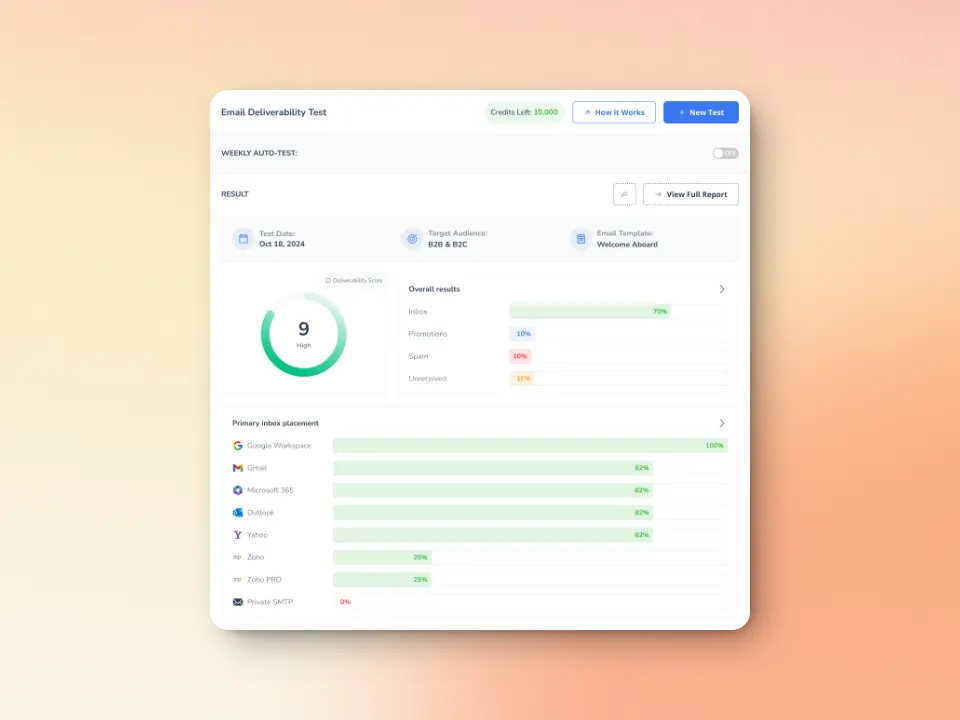
Getting started with Warmy.io is a breeze. Its user-friendly setup and dashboard are designed for efficiency, enabling swift integration into your email strategy without disrupting your workflow.
This ease of use facilitates ongoing adjustments and optimizations, ensuring your email performance continues to excel.
Maximize deliverability by understanding SMTP success codes
Understanding and monitoring SMTP success responses are critical. They reassure that your email campaigns are not just launched but are on the right trajectory to hit the inbox bullseye. This knowledge keeps you ahead in the email race, ensuring your messages dodge the spam folder and secure the attention they deserve.
Remember, the goal isn’t just to send emails. It’s to connect, engage, and convert. Keep a close eye on these SMTP success codes to maintain the health and efficiency of your email outreach.
Armed with this understanding and the right tools, you’re set to navigate the email landscape confidently, making SMTP 2xx codes a language you not only comprehend but also use to your strategic advantage. Remember, success in email communication isn’t just about avoiding errors—it’s about creating connections that drive results.











